INSTRUMENTS / GENERATORS
Fruity Dance
Fruity Dance is an animation plugin. The default animation is 'FL Chan', the FL Studio mascot. You can control her dance movements from the Piano roll by selecting a range of programmed dance moves. FL Chan is related to the Wave Candy plugin in giving your projects visual effects in sync with the music. See the section below on how to make your own animations.
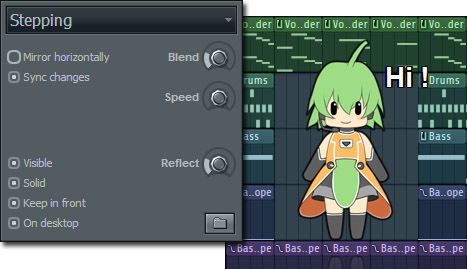
FL Chan has developed a lot of fans since we launched her. See Google Images. If you would like a larger version of FL Chan, you can download that here. Instructions are in the .zip.
How to use
When Fruity Dance is loaded into a channel, an animated character will appear (see above). You can drag the character around the screen using your mouse (click+ hold). The dance moves of the character are driven by the Piano roll (different moves are associated with a range of notes). By placing notes in the Piano roll you can create your own unique sequence of dance steps, in sync with your song. Great when you have a 2nd monitor or video projector hooked up to FL Studio for live performances.
Parameters
The following parameters control the character.
Appearance
- Menu - Lists the dance moves that the character will make when the project is playing. Use this when you want a single move for the duration of your track and don't want to change the moves with the Piano roll.
- Mirror horizontally - Mirrors the character movements around the vertical axis.
- Sync changes - Waits for the dance move to complete a cycle before changing to the next.
- Visible - Character visible.
- Solid - ON: Character steals mouse focus. OFF: Mouse can click through the character to the background user interface.
- Keep in front - Keeps the character on top of all windows.
- On desktop - Allows the character to remain visible on the Windows desktop after FL Studio is minimized.
- Blend - Blurs the animation steps.
- Speed - Tempo multiplier for character movements.
- Reflect - Character reflection intensity.
- Folder icon - Click to load sprite sheets (FL Chan & Countdown supplied). Examine the layout of these sprite sheets and make your own.
Making your own animations
There are two files associated with an animation both located in the FL Studio installation folder\Plugins\Fruity\Generators\Fruity Dance\Artwork.
- Sprite sheet format - Sprite sheets are PNG format image files. All sprite sheets (e.g. Dance.png) are fixed at 8 cells wide with the option from 1 to an unlimited number of rows (each row is a separate 8 cell animation sequence). The last row is always the 'held by mouse' animation. Cells can be of any size (width/height), but all cells in the sheet must be equal. Remember that the image file must use transparency if the animation is to work against the FL Studio/Windows background although any image format (PNG, JPG, GIF and BMP) will work.
- Text file * .txt - Each sprite sheet must have an accompanying text file with an identical name (e.g. MyAnimation.png + MyAnimation.txt). The text file must contain a name for each row in your sprite sheet. The last row (if you have one) should be called 'Held'. Have a look in the existing Dance.txt and Count.txt files if you are unsure what to do.
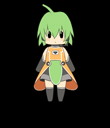
| TIPS: You can drag-n-drop sprite sheets (animation images) directly onto Fruity Dance, the plugin will look in the source directory for the accompanying .txt file. In the Dance.png sheet each cell is 110 pixels wide and 128 pixels high (although the width and height are not fixed and you can make them any size). The animation character will be a solid object while the background is transparent, this is why PNG and .GIF formats are preferred. You will need to use an image editor that supports layers and transparency to make the best animations. Try Gimp free editor |
Plugin Credits
Plugin Code: Gol
FL Chan (character & artwork): Uruido.
Please visit Uruido Web.