MIXING & EFFECTS
Fruity X-Y Controller
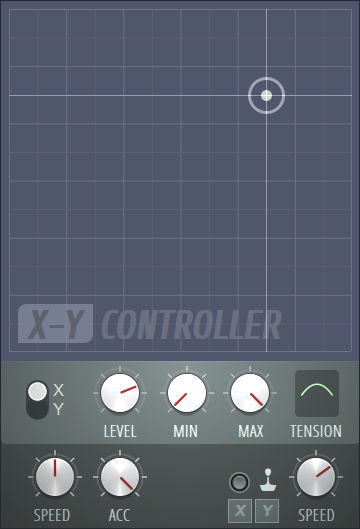
|
Fruity X-Y Controller is an internal controller plugin
that allows you to use your mouse (or joystick) to generate two smooth controller inputs. It has the following inputs:
X-Y Ctrl - X - The value of this controller depends on the X (horizontal) position of a target (small circle with a cross) in a 2D grid. X-Y Ctrl - Y - The value of this controller depends on the Y (vertical) position of the target. To use this plugin, place an instance of it in any effects track. Open the editor window. You will see the target in the middle of a 2D grid. Drag in the grid to change the goal position and the target will follow. The X and Y controller values also change according to the target movement, reaching minimum at the bottom left corner of the grid and maximum at the top right corner. NOTES: Once this plugin is loaded it will appear as an 'Internal controller' link option in the 'Link to controller' Right-click dialog on automatable controls. You can also control the target using a joystick. |
Parameters:
X/Y Setup Section:
Contains options for the X/Y axis interpretation and goal position.
- X/Y switch - If you select X, the rest of the controls in that section will control the behavior of the X axis. If you select Y, they will control the behavior of the Y axis.
- Level knob (LVL) - Sets the X or Y (depending on the X/Y switch) goal position the target is moving towards.
- Minimum Value knob (MIN) - Sets the value of the X or Y (depending on the X/Y switch) controller when the X/Y coordinate of the target is at its minimum.
- Maximum Value knob (MAX) - Sets the value of the X or Y (depending on the X/Y switch) controller when the X/Y coordinate of the target is at its maximum.
- Tension (TNS) - Drag up and down to alter the shape of the curve used to map the coordinate values to the controller values. This parameter is like a controller 'tension' setting.
Additional Options:
- Speed knob (SPD) - Turn to the right to speed up the target's movement toward the goal position. Turn to the left to slow the target down.
- Acceleration knob (ACC) - Sets the acceleration of the target when the goal position changes. Turn to the right for greater acceleration, or to the left for less acceleration.
- Enable Joystick Controller - Turn on this switch if you want to use your joystick to control the target.
- X and Y buttons - Click to launch menus where you can choose which joystick properties will control the X and Y axes.
- Joystick Speed knob (SPD) - Sets the speed of the joystick.
Plugin Credits: Didier Dambrin