INSTRUMENTS / GENERATORS
Toxic Biohazard - LFO
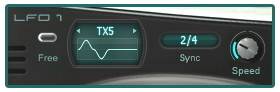
LFO Controls
- LFO Waveform select: This is the window that displays the currently selected waveform for the chosen LFO. Select a waveform by clicking on the title (i.e. Sine) and choosing one from the list.
NOTE: The oscillators have unique "Gated" shapes at their disposal. You can route these gated LFO shapes to an oscillator's amplitude to create "Trance-Gate" like
movement in sounds. You can also select your own waveforms via the Custom loading option.
- SPEED: Determines the speed at which the LFO moves, getting faster as you turn the knob to the right.
- FREE: The 'Free Run Switch' will set the LFO to free running mode, this means it will not be retriggered by each key press, but will instead pick up wherever it left off when you released the
last key.
- SYNC: The 'Sync Menu' allows you to select sync values for the LFO speed relative to the host tempo. When the display shows '---' there is no tempo sync and rate of LFO is defined by
the 'Speed' knob.
NOTE: The oscillators have unique "Gated" shapes at their disposal. You can route these gated LFO shapes to an oscillator's amplitude to create "Trance-Gate" like movement in sounds. You can also select your own waveforms via the Custom loading option.