MIXING & EFFECTS
Maximus Multiband Maximizer 
Included in FL Studio Producer Edition and up. Related plugins are the Fruity Limiter and Multi Band Compressor.
When to use: Anywhere you need accurate compression, but particularly as the last effect in the Master Mixer Track when creating a final master. If you need to compress individual Kick or Bass sounds (for example) we also recommend the closely related Fruity Limiter or Fruity Compressor.
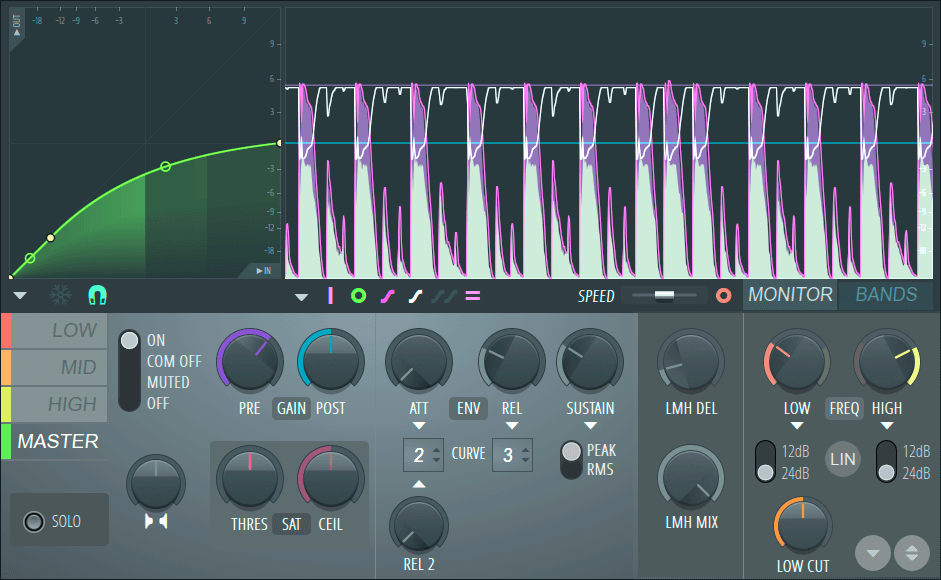
NOTE: Click on the screenshot above to jump to the help for the selected control section.
Introducing Maximus
See the full video series for Maximus  here. Maximus is much more than a pristine quality Mastering Maximizer, it's also a
Compressor,
Limiter,
Noise Gate, Expander,
Ducker and
De-esser. Maximus excels equally well as a final-stage mastering plugin or as a per-track effect, Maximus indeed!
here. Maximus is much more than a pristine quality Mastering Maximizer, it's also a
Compressor,
Limiter,
Noise Gate, Expander,
Ducker and
De-esser. Maximus excels equally well as a final-stage mastering plugin or as a per-track effect, Maximus indeed!
Maximus features at a glance:
- 3 independent user-definable High Mid Low (HML) frequency bands.
- Custom look-ahead for the HML bands and Master compression envelopes.
- 4 limiter/compressors: One per HML band plus a Master wide band limiter/compressor.
- Each compressor has an infinitely variable compression curve. Create any shaped knee or special effects (limiting, compression, gating or expansion).
- Fully configurable. Any of the HML or Master compressors can be bypassed to configure Maximus to suit any limiting, compression or maximization task.
- Two saturation types per HML & Master bands, with independent gain.
- Phase-free mixing between the frequency dependent compressors and the master, perfect for parallel & NY-style compression.
- Per-band stereo separation controls.
- Optional IIR or Linear-phase band-split filtering.
Maximization
Maximus will quickly become one of the most rewarding tools in your recording and mixing arsenal. Maximus applies level maximization via compression and/or limiting across three frequency bands, to enhance and improve the final track. Used sparingly, Maximus raises the volume of the track without introducing unwanted distortion and ensures that the quieter parts, often lost in the mix, are more easily heard. Bass can be increased and higher frequencies sharpened. Selected elements of a mix, instruments or vocals for example, or complete tracks are given a professionally mastered 'presence'.
NOTE: A word or two from The Society for Responsible use of Maximization: Perfect mixes are just a few mouse-clicks away, right? If you want to achieve truly professional (quality) tracks we encourage you to view the YouTube video Louder! and read the Loudness wars Wikipedia entry.
Maximus Controls
All interface controls are discussed on the Maximus Controls Page. Click on the screenshot above to jump to the help for the selected control.
Tutorials
The following sections of the manual explain how to use Maximus in more detail, including -
- Compression
- Limiting
- Parallel / NY Compression
- Sidechain Compression
- Noise Gating
- Ducking
- De-essing
- Decibels (dB)
Useful Internet Links
Louder! - How much is too much YouTube video? Loudness wars - The story continues.
Compression - Explained in Wikipedia.
Image-Line Store - Buy Maximus and other Image-Line Software.