PIANO ROLL
LFO Tool 
The LFO tool allows you to draw LFO shapes in the Event Editor or lower Piano roll.
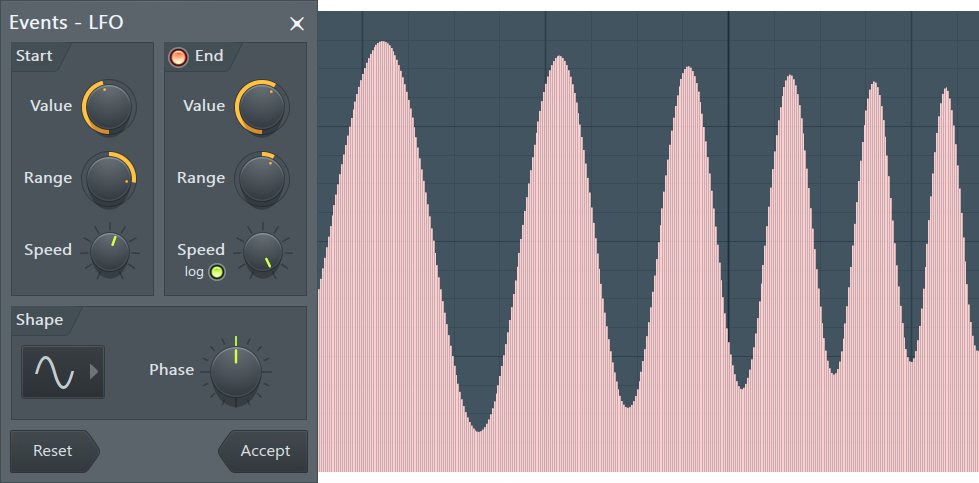
Controls
LFO is drawn only in the selected time range. If nothing is selected, LFO will select automatically the first bar.
Start
- Value - Sets the value of LFO.
- Range - Sets the range between the lowest and highest points in LFO.
- Speed - Sets the frequency of the LFO (i.e. its speed). Right-Click for a menu with tempo-based presets.
End
Contains the same parameters as the Start section. When you turn on the LED in the top left corner of this section, LFO's settings will vary from those in the Start section to those in the End section. If LED is turned off, then only the settings from the Start section are used.
Shape
Sets the shape of the LFO - sine, triangle or square (to select a shape click any of the icons at the top left corner of this section). The Phase knob sets the phase of the LFO (basically this moves the LFO shape left and right).
Action buttons
- Reset - Reset the tool to the default state.
- Accept - Accept changes and close the tool. Note, these changes can be subsequently undone using the Current project History or Ctrl+Z.