WAVE EDITOR / RECORDER
Edison 
Edison is a fully integrated audio editing and recording tool. Edison loads into an effect slot (in any mixer track) and will then record or play audio from that position. You may load as many instances of Edison as you require in any number of Mixer Tracks or Effects slots. To open Edison press Ctrl+E in a Sampler Channel, or load from the effects menu into mixer track/s.
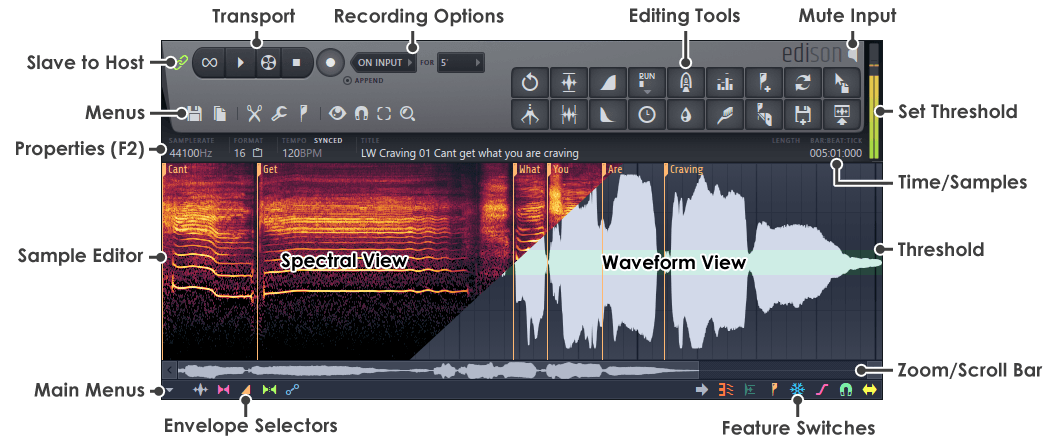
Transport Controls
Recording Options
Menu Buttons
Sample Edit Functions
Special Controls
Peak Meter
Sample Edit Window
Main Menu
Envelope Selector
Feature Switches
Zoom/Scroll Bar
Time/Sample Display
The time display shows the time-base in either samples or seconds. To change between the two types, Left-click on the Sample Edit Window and select View > Time in samples. Some useful editing features can be accessed by Right-clicking on the number readout (Time/Samples above):
- Deselect (Up arrow) - Deselects the current selection.
- Select before current selection - Selects the area before the current selection.
- Select after current selection - Selects the area after the current selection.
- Select zoomed part (Ctrl+A) - Selects the region defined by the visible sample.
- Select previous region (Left arrow) - Selects the previous region.
- Select next region (Right arrow) - Selects the next region.