PIANO ROLL
Arpeggiator Tool 
The Piano roll Arpeggiator tool allows you to apply arpeggio effects based on fully customizable arpeggio scores and a set of additional options. Unlike the arpeggiator in the Channel Settings, the Piano roll Arpeggiator is not a real-time effect, however it allows for much more customization and control.
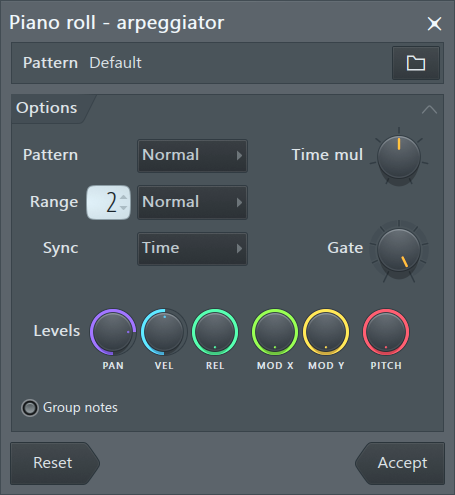
Controls
Pattern
- Pattern (Browse) - Allows you to load an FL Studio Score file (*.fsc) to be used as arpeggiator pattern. See guides for creating such scores below.
Options
- Pattern - Provides the following options: Normal - uses the pattern as defined; Flip vertical - reverses the order of the notes in the pattern; Alternate - alternates between normal and flipped modes with each repetition.
- Pattern transpose menu - Flip the pattern vertically or alternate.
- Time multiplication - Stretches the time of the pattern score by integer amounts (1x, 2x, 3x, 4x slower when turned right and 1x, 2x, 4x, 8x faster when turned left).
- Range - The arpeggiator range in octaves.
- Range pattern - Sets the arpeggiator up/down pattern. Normal: Low-High repeated. Flip: High-Low repeated. Alternate: Low-High-High-Low repeated.
- Sync - Selects the event that determines the end of the arpeggiator loop. Time: this selection will disable repetitions; Block: end of loop is considered the time all notes are turned off; Chord: end of loop is considered the time when one of the notes from the chord turns off;
- Gate - Shortens the length of the arpeggiated notes by the specified amount to create a gating effect.
- Levels - Mixes the per-note levels (pan, volume, pitch, etc.) of the current score with those of the loaded pattern (turn right to mix more of the levels in the pattern).
- Group notes - Groups chopped notes (that is horizontal grouping of the original notes chopped pieces).
Action buttons
- Reset - Reset the tool to the default state.
- Accept - Accept changes and close the tool. Note, these changes can be subsequently undone using the Current project History or Ctrl+Z.
Guides for making Arpeggiator / Chop patterns
Arpeggiator and Chopper patterns are regular Piano roll scores, but are interpreted in a special way to fit the purposes of the Arpeggiator tool. Templates can be found in the FL Studio installation folder under ..\Data\Patches\Scores\Arpeggiator or if you select the Piano roll menu > File > Open score, this should open in the Scores folder.
- Notes in the pattern are considered relative to the note being arpeggiated. C5 means the arpeggiated note, C#5 is the note above it, etc.
- Notes that cover the whole pattern are considered "sustained notes" - they are not arpeggiated and are left intact.
- Colors - The first 4 colors in the selector are used in chopper/arp scores.
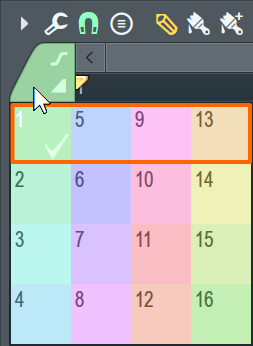
1 (Green) - The boundary of green notes defines the chopping pattern while the position relative to C5 the transposition. For Chopper scores all notes should be placed on C5, this instructs the Chop tool that all notes of the original score should remain at their original pitch. For Arpeggiator scores, source notes will be Arpeggiated relative to the interval between C5 and the notes set, For example, C5 = no pitch change, F5 = +5 semitone transpose and A4 = -3 semi-tone transpose. So if the source note in the original Piano roll was B4 and the Arpeggiator score was at F5 for the overlapping portion of the source and arpeggiator score, then the B4 would be transposed to D (+5 semitones).
5 (Blue) - Defines a note that will not be chopped.
9 (Pink) - Pink notes are not affected by the octaves range set in the dialog
13 (Yellow)- Defines the length of the pattern, useful when the chop/arp pattern does not extend to the end of the bar.