INSTRUMENTS / GENERATORS
Fruity Keyboard Controller
Fruity Keyboard Controller generates automation data to control modulation targets (knobs, sliders etc.) from Piano roll or a live MIDI input. MIDI Note or velocity can be used as the modulation source. Read more about internal automation controllers here. A closely related plugin is Fruity Envelope Controller.
How to use:
- Load Fruity Keyboard Controller in the Channel Rack.
- Adjust the plugin as needed (see below for details).
- Link a target Synth, Effect or interface control to the Note or Velocity from the Link Dialog > 'Link assignment' menu.
- Add trigger notes to a Piano roll and edit their key/note number or velocity to control the target as needed.
Video Tutorial
BONUS: Download the projects used in this tutorial here.
Output: Internal Controllers
When Fruity Keyboard Controller is loaded in the project, two options will be available for linking:
- Fruity Keyboard Controller - Note - Automation data depends on values assigned to each note via the Note Mapping Controls (see below).
- Fruity Keyboard Controller - Velocity - Automation data depends on the note velocity. The actual note played does not matter only velocity is passed.
Note Mapping Controls
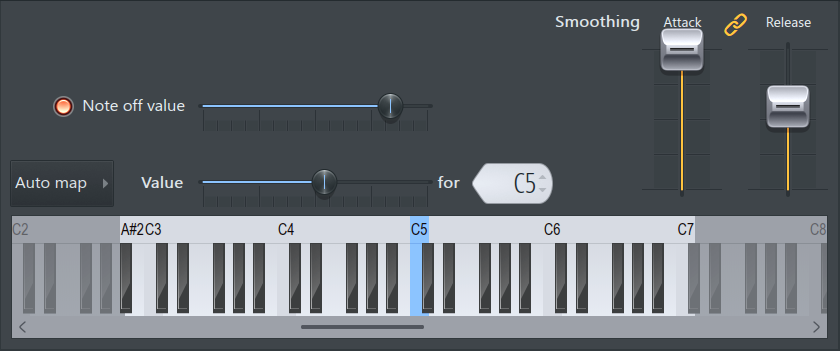
By default, lower notes generate low automation values and high notes high values. If you run your finger up and down the piano keyboard, the linked control will increase and decrease in response to the position of the notes on the keyboard. Alternatively, you can also customize every note to output user selected values as follows:
- Note off value (switch) - Select to transmit a custom automation value on key release.
- Note off value (slider) - Value sent on note release. Click notes on the keyboard below to select them and then set the slider.
- Value (slider) - Value sent when a key is pressed for the selected note (highlighted in blue). Click notes on the keyboard below and then set the slider. NOTE: This parameter does not affect Fruity Keyboard Controller - Velocity, this is always linked directly to note velocity.
- For (Current Note Display) - Shows the selected note. Select notes by clicking on the keyboard below. The selected note shows in blue (see below).
- Auto Mapping (Drop-Down Menu) - These functions auto-map the selected key-range (the light-gray keys on the preview keyboard) from 0% to 100% automation values.
- Smoothing - Sets the Attack (time to reach the note ON level) and Release (time to reach the note OFF level) time when a note is played. Increase the values to create smoother transitions between notes.
 - Links the values of the Attack and Release controls.
NOTE: The FL Studio's 'animations' smoothing setting as reflected in the Keyboard Controller GUI do not affect the output from the plugin. However the Link dialog also has a smoothing option and this will interact with the smoothing settings used on Fruity Keyboard Controller.
Keyboard View
The keyboard view is related to the preview keyboard seen on Channel Settings.
-
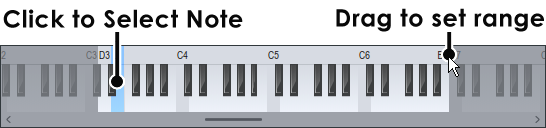
Selected Key - Left-Click notes to select them. The selected key is blue. Changes to the Note Mapping Controls will apply only to this note.
-
Key Range - The Key Range is used with auto mapping and defines the range of active notes for automation control. When auto mapping the first note in the range is set to the minimum value (0%), while the highest note is set to the maximum value (100%). The keys between those two notes are auto-mapped to the intermediate values. Set the limits by clicking and dragging along the note ruler (where it shows C4, C5 etc). NOTE: Wider the ranges allow finer the automation control.
Notes & Tips
- There are a number of useful presets available:
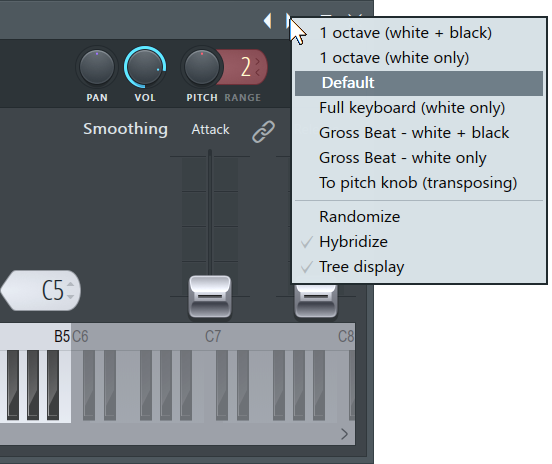
- Gross Beat control - Fruity Keyboard Controller can be used to control Gross Beat.
- Filtering - Use Fruity Keyboard Controller to Perform Pattern/Piano roll controlled filtering by linking it to a filter cutoff.
- Pitch bend native plugins - When mapping the Keyboard Controller to the pitch bend of a native FL Studio synth use a Key Range of 8 octaves + 1 semitone. Select the 'To pitch knob (transposing)' preset and link Fruity Keyboard Controller to the target plugin's Channel Pitch knob.
- Pitch bend VSTs - When mapping standard VST synths for pitch bend control set a Key Range of +/-12 semitones, use the '1 octave (white + black)' preset. Then link Fruity Keyboard Controller to the target plugins Channel Pitch knob.
Plugin Credits: Didier Dambrin