INSTRUMENTS / GENERATORS
Sytrus 
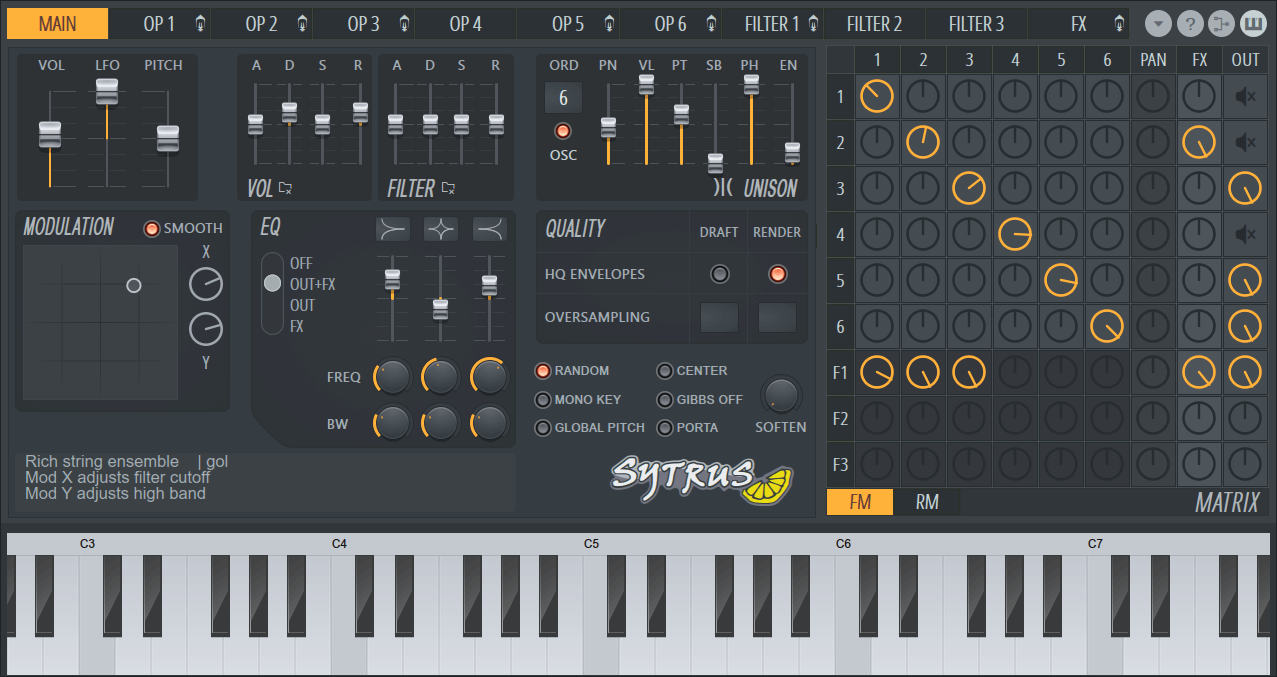
Sytrus is a powerful and versatile synthesizer featuring six customizable oscillators (operators). It can perform FM (Frequency Modulation), RM (Ring Modulation/Amplitude Modulation), Subtractive and Additive synthesis. It includes 3 filter modules, an effects module with chorus, three delay lines and unique, per-voice programmable Unison envelopes.
Along with this flexibility comes complexity. However, if you stick with Sytrus and study this help file (there's a easy step-by-step tutorial here), we are sure you will find Sytrus to be one of the most rewarding plugins in the Image-Line library.
Video Tutorial
Video Index: 00:00 Introduction, 00:23 Basic Functions | UI overview, 01:29 Basic Functions | Operator controls, 06:09 Concepts | Subtractive Synthesis, 07:47 Example | Supersaw, 08:36 Example | Acid Bass, 09:21 Example | Reese Bass, 10:08 Concepts | Additive Synthesis, 11:17 Example | Synth Keys, 11:36 Example | Resynthesis Pluck, 12:03 Concepts | FM Synthesis, 19:20 Example | Donk, 19:47 Example | 80s Bass, 20:29 RM/AM Synthesis, 21:55 Example | Noise Bass, 22:23 Example | RM/FM Reese Bass, 22:59 Outro.
Want more sounds? - There are a large number of user created Sytrus patches available on-line in the dedicated Sytrus Presets & Tips Forum.
See  Sytrus video tutorials
on Image-Line's YouTube channel.
Sytrus video tutorials
on Image-Line's YouTube channel.
Features Index
- The Main Module
- The Operator Module
- Working with the Harmonics Editor.
- Working with Envelopes
- Creating Arpeggios
- The Filter Module
- The Effects Module
- Basics of FM Synthesis
- The Modulation Matrix
- Sytrus Tutorials
- Notes & Tips to Patch Creators
- Options, Helpers and Tools
Sytrus Main Module
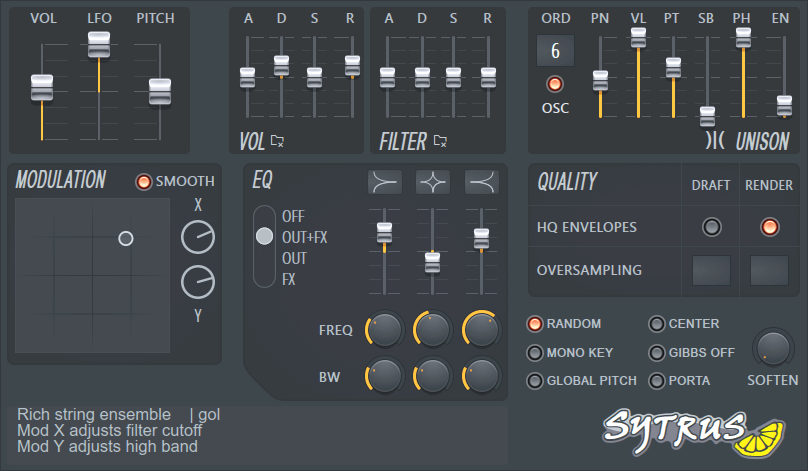
The main module contains some global settings for the current patch. It provides less experienced users with easy to use global filter and volume envelope levels, allowing them to adjust the existing patches to their preferences, even if they lack experience in the programming of FM synthesizers.
Main Module Options
- Master Levels
- Master Level (VOL) - Sets the master volume level of the patch.
- Master LFO (LFO) - Sets the master LFO level. Notice that the property range is -128 to 128, so to effectively disable all the LFOs across the patch, position the slider at the middle (or Alt+click to reset to the neutral value).
- Master Pitch (PITCH) - Sets the master pitch of the patch. The range is -2 octaves to +2 octaves. To use the original pitch, position the slider in the middle or Alt+click.
- Global Volume Envelope Levels - These properties allow you to define global offsets to the volume envelopes of all modules in the patch. Please note that if the patch does not
use ADSR Vol parameters these will have no effect.
- Attack (ATT) - Defines the attack length/speed.
- Decay (DEC)- Defines the sustain section length/speed.
- Sustain (SUS) - Defines the sustain section slope ('decay' amount).
- Release (REL) - Defines the release length/speed.
- Global Filter Envelope Levels - These properties allow you to define global offsets to the cutoff/resonance filter envelopes in the patch. Please note that if the patch does
not use ADSR filter parameters these will have no effect.
- Attack (ATT) - Defines the attack length/speed.
- Decay (DEC)- Defines the sustain section length/speed.
- Sustain (SUS) - Defines the sustain section slope ('decay' amount).
- Release (REL) - Defines the release length/speed.
- Unison Mode - The highly customizable unison mode is a great feature that allows you to quickly add depth and texture to even simple sounds. Unison works by triggering a user-defined number of 'subvoices' for each note played. Each sub-voice can have slight variations of panning, volume, pitch, phasing to generate a thicker, softer sound with rich stereo spread. For a quick overview see this video.
The global unison settings are:
- Unison Order (ORD) - Sets the number of voices in the unison (drag up-down). To turn off (default), drag down until the indicator disappears.
- OSC - CPU saver. Merges unison voices before passing through a single filter as opposed to multiple independent filter paths when the switch is off. The result is a CPU saving mono unison that is the same number of unison voices as the normal unison but with no stereo spread.
- Unison Panning (PN) - Sets the panning variation across the unison voices.
- Unison Volume (VL) - Sets the volume level variation across the unison voices (the closer to the center a voice is, the louder it will sound).
- Unison Pitch (PT) - Sets the pitch variation (detune) across the unison voices.
- Unison Sub-Level (SB) - If set higher than zero, a duplicate for each unison voice is created, with a pitch offset of -1 octave. This parameter sets the volume of the sub-level voices.
- Unison Phase (PH) - Sets the initial oscillator phase variation across the unison voices.
- Envelope variation (EV) - Sets the amount of variation added to the attack and decay of the filter cutoff, resonance and volume envelopes of each unison voice.
NOTES: 1. Several Unison variations are selectable from the Effects section of the Options menu (
 Unison is also fully programmable from the unison mapping envelopes available in the articulation section for each module. 3. Unison triggers real voices so the polyphony of Sytrus is multiplied by the number of unison voices. This can use a lot of CPU if not used carefully, so use unison mode with a moderate number of voices and try to use the integrated chorus effect if you don't want to use any of the advanced features of the unison mode.
- Modulation (X/Y Controller) - The modulation interface represents two adjustable controllers (horizontal and vertical direction). They are designed to be linked to real-time controllable parameters within the articulation section of each of the Sytrus modules.
To set the values of the X/Y controllers, drag inside the controller screen or adjust the knob values provided for the X and Y values. You can also set the initial Mod X/Y values for each note via the Piano roll properties (in the Note Properties menu you will find two additional entries: Mod X and Mod Y).
The Smooth option can be enabled if gradual smooth changes are preferred over quick changes for linked properties and articulators. For more information on the Mod X/Y mappings, see the Envelope Editor.
- Equalizer (EQ) - Sytrus includes a parametric 3-band equalizer, which can filter the effects module signal and/or the output signal.
- Scheme Selection (LED check boxes) - Allows you to select how the equalizer is processed in the synth mixing chain. OFF disables the equalizer; OUT+FX filters both the effects module signal and the main output signal; OUT filters the main output signal only, and FX filters the FX module signal only.
- Equalizer Bands - The equalizer has 3 bands with adjustable range and frequency. By default the first band is low shelf, the middle is peaking band and last is high shelf. However, by Left-clicking on the EQ type icon above the sliders and dragging up and down, each band can be changed to one of the other two types. Using these three bands you can achieve all basic frequency filtering you need - low pass, high pass, band pass, peaking, notch filter, bass boost, etc.
- Frequency Knobs - Adjust the frequency of each corresponding EQ band (turn right to increase frequency).
- Range Knobs - Adjust the range (width) of each corresponding EQ band (turn right to increase band range). Bands with wider range have more impact over the filtered signal.
- Misc Settings
- Random - Enables random mapping in the articulation section of each module (see the Envelope Editor for more information on random mapping). If you use small property variations via random mapping to introduce a more inaccurate performance (e.g. to simulate a live performance or the slight inaccuracy of old analogue synths), this option allows you to quickly turn the randomness off and get "perfect" output without losing your settings.
- Mono Key - This is a CPU saving feature. Enable this option to limit the number of voices per key to one (unison voices are still generated if unison is enabled). For example, when you play a note with a long release, then play the same note again before the previous release has ended, it adds to the number of notes being played and so CPU load. Mono Key cuts decaying releases from old notes when the same notes are played again. How this sounds in practice will depend on the patch. Mono key mode is a CPU saving feature.
- Soften - Applies a softening filter to the attack of voices with velocity less than the default (100 for MIDI input/import). Turning the knob right increases the effect, while turning it fully left disables it.
- Global Pitch - Enable this option to make the pitch articulation of Operator 1 global, so that all other operators use it as a base from which to offset their own pitch settings.
- Center - Enable this switch to remove the DC offset from the final Sytrus output. This should be enabled if DC offset is present and affecting sound quality.
- Attenuate Gibbs Phenomenon (GIBBS OFF) - This option attenuates an unwanted side-effect of synthesis called the 'Gibbs phenomenon', i.e. low-level oscillations (ringing) around the point of sharp transitions in output amplitude (discontinuous line). You can learn more about Gibbs phenomenon on the internet. Alternatively you may choose to use the (per operator) version of this command in the Harmonics Editor. NOTE: The Gibbs attenuator will not be needed with 2X oversampling or more in use.
- Portamento (PORTA) - Enables pitch envelope-controlled slides or 'glissando' (in addition to the usual Piano roll based slides in the native version of Sytrus). To activate envelope based portamento: enable a pitch envelope with an attack segment and define the envelope for the main operator (oscillator) in global mode (to affect all operators). To gain familiarity with this function load the 'Porta - basic.fnv' in the pitch envelope and examine how the duration of the attack portion of the (flat) pitch envelope controls the portamento duration/speed (see Options -> Porta for more details).
- Quality Settings - The quality settings are split into two sections - draft (real-time) and rendering. This allows you to optimize Sytrus for real-time performance and for high-quality output during rendering.
- HQ Envelopes - Increases the envelope accuracy, but with greater CPU use. In many cases, this option is not required as the default setting is sufficient.
- Oversampling Factor - Enables oversampling in order to increase the accuracy of the Sytrus rendering engine and to reduce aliasing. It is recommended to use oversampling only during rendering, unless the patch complexity and your CPU allow for high quality real-time performance. NOTE: in some cases, oversampling may alter FM feedback slightly as well as the filter sections, so it is advisable to test how your patch sounds with oversampling in real-time, if you plan to use it in your final output.
- Info / Comments - Assign the patch name and author name, as well as add any comments on the patch usage (such as X/Y controller usage, recommended patch usage notes, etc.)
Sytrus - The Operator (Oscillator) Module
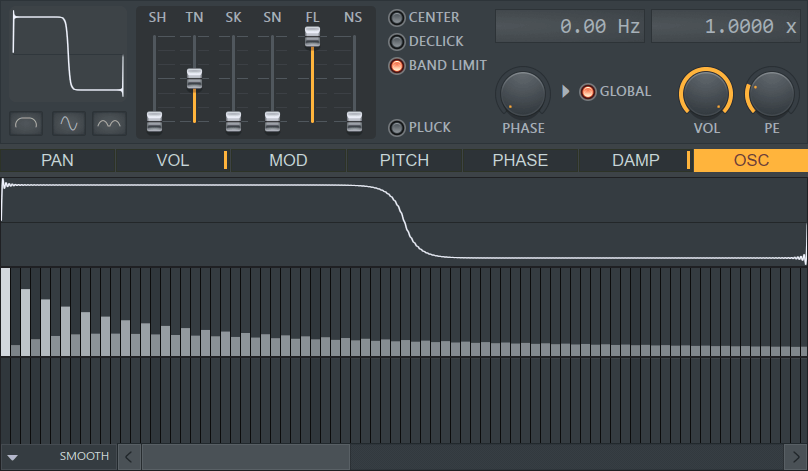
In FM Synthesis Oscillators are called 'Operators', this is because they can be used to modulate other operator (oscillator)s. The operator (oscillator) modules are central to the Sytrus synthesis engine as this section is used to define the operator shape and pitch. The module supports full articulation section (envelopes and mappings of volume/pitch/phase, etc.)
Oscillator Settings
- Shape Preview Window - The shape preview window shows the operator/oscillator shape after it is processed with the harmonics and other modifiers. There are 3 switches below the shape window (from left to right):
- Half - Uses only the first half of the shape phase in the sound generation.
- Even - Each odd phase of the shape is rendered silence.
- Absolute - The shape values are made absolute (only above the middle line).
- Shape Modifiers - The modifiers are a set of parameters which can help you in adjusting the operator (oscillator) shape to suit your needs. Alt+click a modifier to reset it to its default level:
- Shape (SH) - Allows to morph the shape to sine, triangle and pulse (via the other modifiers you can also achieve saw and other shapes).
- Tension (TN) - Sets the tension (distortion) of the base operator (oscillator) shape.
- Skew (SK) - Allows you to "skew" the base operator (oscillator) shape.
- Sine Shaper (SN) - Applies a transform which is useful for certain patch types (such as bells).
- Pre-Filter (FL) - Applies a smoothing (low-pass) filter to the shape. This can reduce potential aliasing artifacts but makes the sound less bright.
- Noise (NS) - Mixes 'white' noise with the operator (oscillator). At maximum it only plays white noise, in the middle its half white noise, half the operator (oscillator). This can be useful with plucked mode (which requires rich spectrum) and drum/percussion samples.
- Pitch Offset & Multiplier - Set the base pitch of the operator (oscillator). Position the cursor over a digit from either display and drag up/down.
- Frequency Offset allows you to adjust the pitch as an absolute offset in Hz.
- Frequency Ratio is a multiplication over the base pitch. The default value is 2. To increase the pitch by an octave, multiply by 2 (x2, x4, x8, x16, etc). To decrease by an octave divide by 2, 4, 8 (x0.5, x0.25, x0.125 etc).
- Misc Settings
- Center - A DC offset removal.
- Declick - Applies a special filter to avoid clicks when starting a voice (useful for operators with sharp attack).
- B.Limit - Band limits the waveform.
- Pluck - Plucked mode turns the operator (oscillator) into a plucked string simulation unit. The unit basically starts with the original spectrum as set by all harmonics and modifiers then a gradual "damping" occurs which filters that spectrum to a sine wave with the pitch value of the operator (oscillator). For this mode to work it is recommended to start with a spectrum rich operator (if you start with a simple sine there is no audible effect). The damping amount is controlled via the DAMP articulation target (see articulation below). Note that an operator (oscillator) in plucked mode can not be frequency modulated (FM) by other operators,so its FM row in the matrix will be disabled while plucked mode is on (however ring modulation /RM/ is still available).
- Phase (PHS) - Sets the initial phase offset for the operator (oscillator) when a voice is started (or global offset, depends on the next option).
- Global - Enable this option to use a "global" phase for the operator (oscillator) in all voices (i.e. sync the phase between all voices for the operator).
- Volume (VOL) - Sets the operator (oscillator) volume. IMPORTANT NOTE: The modulation levels (knobs) in the mod matrix can't be automated, however this volume property has the same effect as doing that, and it CAN be automated.
- Pitch Envelope/LFO Amount (PE) - This property sets the range the pitch articulators operate with (the default value is 12 semitones).
You can copy all the settings defining the oscillator and paste them to a different operator (oscillator) by using the Copy/Paste Oscillator Settings command in the Options menu (
). The menu also contains the Reset Oscillator Settings in case you need to quickly revert all oscillator settings to their default position.
- Articulation Section - The articulation section allows you to apply an envelope, LFO, map keys, velocity or unison mode voices to a set of predefined properties. To see the full list of envelopes/mapping in the articulation section and their meaning, please check the envelope editor page.
The filter mode supports the following articulation targets (controlled parameters):
- Panning (PAN) - Sets the operator (oscillator) output panning (graph bottom = left panning, graph top = right panning).
- Volume (VOL) - Sets the operator (oscillator) output volume (graph bottom = no output, graph top = maximum output).
- Modulation Influence (MOD) - Defined the amount of 'influence' other operators (as modulators) can have on the current operator (graph bottom = no modulation, graph top = maximum modulation).
- Pitch Offset (PITCH) - Sets an offset to the operator (oscillator) base pitch (graph bottom = -100% offset, graph top = +100% offset).
- Phase Offset (PHASE) - Sets an offset to the operator phase (graph bottom = -100% offset, graph top = +100% offset). If you vary the phase via the LFO articulation unit, the result is a vibrato effect.
- Plucked Damping (DAMP) - This target has effect only if the plucked strings mode is enabled for the operator (oscillator). This envelope/mappings set controls the plucked string dampening amount (graph bottom = 100% dampening, graph top = no dampening).
- Oscillator Harmonics Editor (OSC) - A feature-rich harmonics editor and external sample analyzer lets you adjust the oscillator for every operator (oscillator) in Sytrus.
Sytrus - Working with the Harmonics Editor
The operators in Sytrus contain a fully-featured harmonics editor in which you can define an oscillator shape with up to 128 harmonics, either by drawing the harmonics manually or by analyzing external samples. Working this way to produce waveforms for the Oscillator is an example of Additive Synthesis. A harmonic is a sine-wave that is an exact (integer) multiple of the starting frequency (in this case 1,2,3,...128). Harmonic Editors allow you to perform 'additive synthesis', in which you mix together harmonics (upper facing bars) and adjust their phase (downward facing bars). Using this technique you can create any type of waveform.
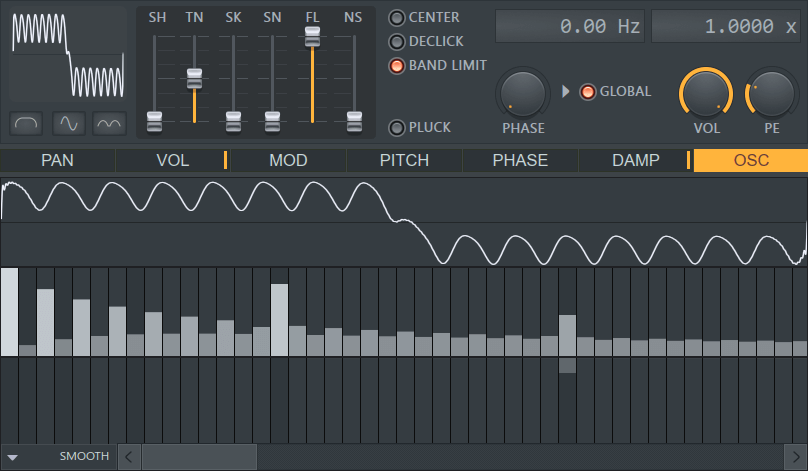
NOTE: You can also drop single-cycle waveforms extracted from any audio file onto the Waveform Display, and Sytrus will use the harmonic editor to 'resynthesize' it. Then use the editor to 'tweak' it. Simpler than making one from scratch!
- Harmonic Amplitude: The top row sets the number and level of harmonics to be mixed with the shape (order increases from left to right). Left-click and drag inside the row to add harmonics to the shape. Right-click and drag to draw 'lines' inside the graph. ALT+click to reset the harmonics levels to neutral position. The scale of the amplitude levels is logarithmic, useful for when you need to add small amounts of a harmonic to the oscillator.
- Dark bands: To make editing more convenient, darker harmonic levels indicate frequency offsets in octaves (e.g. +1, +2, +3 octaves, etc).
- Harmonic Phase: The lower row sets the harmonic phase (time offset in the range of one oscillator cycle).
- Harmonic frequency: There are 128 harmonics available. To access higher harmonics use the horizontal scrollbar at the bottom of the graph. You can also Zoom sections by dragging on the left or right edge of the slider along the bottom of the graph. NOTE: Harmonics are only active if the corresponding harmonic has a level higher than 0.
- Keyboard Shortcuts - Lock/Unlock harmonic (CTRL + Left-click), Focus on harmonic (SHIFT + Left-click), Clear harmonic (ALT + Left-click), Affect multiple harmonics (Right-click + drag across harmonics).
- SMOOTH - Applies smoothing to the levels in the harmonics editor (averaging the levels with their neighbors). When odd/even harmonics are locked, only they will be smoothed (however, all harmonics will still be considered when computing the average values to apply.
- Additional Commands Menu ( ) - Click the arrow at the bottom left corner for commands related to working with the harmonics:
- Convert shape to sine harmonics - A sine shape is the default for each operator (oscillator). This makes working with harmonics easier and more predictable. You can use this command to convert an oscillator with a non-sine shape to the closest representation of sine wave available. If the shape is already a sine, this command has no effect.
- Analyze single-cycle waveform - Allows you to analyze ('import') an external sample as an oscillator shape. Please note the following restrictions: the sample needs to be an oscillator shape ('single cycle' sample), as opposed to sample playback in samplers. Also, keep in mind that no sample is imported. Rather, the harmonics of the sample are analyzed and imported as harmonic settings in the Harmonic Editor. If the sample is too long and/or too complex the import might not be accurate.
- Export single-cycle waveform - Creates a .wav file of the current waveform in the Editor.
- Lock harmonics - Use this to selectively gain control of the harmonic bands. The options are None (default), All, Odd, Even, Invert and Inactive (note that if this does not appear to lock inactive bands they probably have a very small level not visible in the Editor,). ALT+Left-click will clear a band.
- Transpose One Octave Up - This command 'multiplies' the position of the harmonics to shift them up with an octave. Bear in mind that some information will be lost (for all harmonics and the high end which go out of range /above 128'th harmonic/).
- Shift Left/Right - Shifts the harmonics one position to left/right.
- Smooth up soft/hard - These options smooth the harmonics by a small (soft) or large amount (hard). Designed to avoid waveform clicks.
- Attenuate Gibbs Phenomenon - Applies techniques to attenuate the 'Gibbs phenomenon' as a pre-processing step applied to the harmonic levels. There is also a runtime 'Gibbs attenuation' option, found in the Main Panel. The 'Gibbs phenomenon' causes ringing around the point of transition in oscillators with sharp transitions (discontinuous line). You can learn more about Gibbs phenomenon on the internet.
- Remove Gibbs Phenomenon - Removes the 'Gibbs phenomenon'. The 'Gibbs phenomenon' causes ringing around the point of transition in oscillators with sharp transitions (discontinuous line). You can learn more about Gibbs phenomenon on the internet.
- Reset phases - Restores the Phase settings to their original state.
- Randomize phases - Randomizes the value of any active phase bars. What did you think it did? :)
- Copy/Paste - Allows you to copy the harmonic settings of an oscillator and paste them to another oscillator. There are several modes: Replace - the "classic" method in which old data is replaced by that in the clipboard; Add- sums the existing harmonics with the clipboard; Subtract - subtracts the clipboard levels from the existing levels; Multiply - Multiplies the existing harmonic levels with those in the clipboard; Blend - sums the existing harmonics with the clipboard at 50%.
Sytrus - Working with the Envelope Editor
The Envelope Editor may be used to adjust the articulation settings of a module including all envelopes, LFO and mapping charts. Sytrus envelopes are very customizable - each envelope segment can consist of unlimited nodes and segments, each with customizable tension (acceleration). The articulator combines the best of multi-point envelopes and more simple ADSR envelopes with special section markers that allow for ADSR automation. Section markers can also be used to create arpeggios which can also be defined within envelopes.
Common Functions & Editing
Although there are several different types of envelopes and maps in Sytrus, they all share common functionality, as described below.
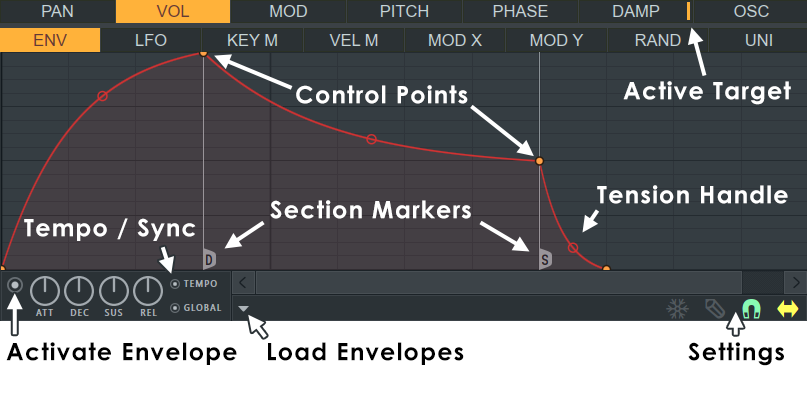
- Activate Envelope Switch - To use envelope/mapping, you first need to enable it by turning on the LED at the bottom left of the editor (see the screenshot above).
- Load/Restore & Copy/Paste - Note the placement of the load/restore button in the screenshot above. NOTE: Not all options appear for all Envelope sources.
- Open state file / Save state file - Opens/saves envelope states. Several different pre-defined state files are available.
- Copy state / Paste state - Use this to copy and paste envelopes, usually between instances of the EQ editor across open plugins.
- Reset - Reset to default state.
- Prepare for smooth editing - Creates a smooth tension between existing points.
- Select all - Selects all points for simultaneous adjusting.
- Deselect all - Deselects all points.
- Invert - Selects all points except currently selected.
- Cut - Cuts points.
- Copy - Copies points.
- Paste (insert) - Inserts copied points after a selected point.
- Paste (replace) - Replaces selected points with copied points.
- Duplicate - Duplicates selected points.
- Delete - Deletes selected points.
- Bipolar LFO tension - The LFO shape is mirrored above and below 0. Into both the positive and negative.
- Frozen LFO - The first LFO value is held. The LFO envelope (red) continues to act on this value.
- Make all loop - Includes all points into a loop.
- Insert point at locator - Inserts a point at the position of the locator.
- Flip vertically - Inverts the current envelope.
- Scale levels - Opens the Scale Level tool.
- Normalize levels - Scales the envelope so the highest and/or lowest levels reach +/- 100%.
- Decimate points - Opens a simple tool that allows manipulation of the number of control points in the envelope (useful in conjunction with Analyze audio file).
- Filter - Opens the Envelope Filter tool (useful in conjunction with Analyze audio file).
- Smooth up - Opens the Smooth Up tool that allows smoothing of the envelope shape (useful in conjunction with Analyze audio file).
- Smooth up abrupt changes - Quick removal of 'spikey' or sudden changes in the envelope.
- Turn all points smooth - Preset filter to quickly filter the envelope.
- Create sequence - Opens the Envelope Sequencer tool.
- Analyze audio file - Open, analyze and replicate the volume envelope of an input sound file. Drag and drop audio files directly on the Envelope editor for automatic analysis.
- Focus on click - When on, clicking on the envelope editor will focus the control and thus steal keyboard focus from other controls.
- Background gradient - Flips the background gradient shading vertically.
- Invert grid - Flips the background colors.
- Settings
- Freeze - Enable this switch to lock the envelope curve to its current setup. This feature is useful if you have finished changing the spline structure of an envelope and want to protect it from accidental edits (it also hides the handles to provide a clear view of the shape).
- Step - Enable this option to set the Editor to step editing mode. Drag within the editor to create a 'free hand' curve in which a new control point is defined for every step in the timeline. Hold SHIFT while dragging to draw 'pulse' lines (straight vertical/horizontal lines only). Note that each new segment created in this mode uses the same tension as the previous segment.
- Snap - Enable this option if you want the control points to snap to the nearest step in the timeline while dragging.
- Slide - Enable this option to preserve the relative distance between a dragged control point and all control points after it (this option is enabled by default).
- Curve Editing - There are several basic operations for editing the envelope/mapping shape:
- Add a new Control Point - Position your cursor over the line until the add point cursor appears. Right-click and a new point will be added.
- Reposition a Control Point - Drag control points using your left mouse button. Hold SHIFT while dragging to lock the vertical position, or CTRL to lock the horizontal position.
- Delete a Control Point - Right-click a control point and select Delete. Alternatively, hold ALT and Left-click.
- Change a Segment Type - Sytrus offers 5 types of spline segments for joining control points. To open the menu, Right-click a control point (the selection applies to the preceding segment):
- Single Curve - Default mode for creating linear, ease-in and ease-out curves (depending on the tension).
- Double Curve - Smooth 'S' curves.
- Hold - Single steps between points, handy for creating abrupt value changes in the envelope.
- Stairs - Multiple steps between the control points. Left-click on the tension handle and move your mouse up/down to change the step frequency.
- Smooth stairs - Multiple smooth steps between the control points. Left-click on the tension handle and move your mouse up/down to change the step frequency.
- Change Segment Tension (Acceleration) - To change the amount of tension, Left-click on the tension handle (the circle located half way between the control points) and move your mouse up/down. Right-click the handle to reset to a straight line. Hold CTRL during adjustments to fine-tune.
- Envelope Sections (ADSR) - Some of the envelopes/mappings are divided into sections to provide classic ADSR (attack, decay, sustain, release) envelope functionality.
Sytrus uses special section markers (see the screenshot above) to mark the end of a section and the start of the next one. There are few markers available:
- S (sustain): Marks the end of the decay section and the start of the release section.
- L (loop): Marks the start of a sustain loop section - enables you to define an envelope section to be repeated while a voice is sustained.
- D (decay): Marks the start of the decay section.
- DL (decay/loop): Combines the functions of the L and D markers.
It is not necessary to use any or all of the markers provided. Without markers the envelope will be played once as a 'static' definition played once from start to finish for each voice. You can also use certain combinations as needed.
How to Add a Marker:
Right-click the control point where you want to set the section marker. From the menu select the marker you want to add. If the item you want to add is disabled make sure the marker is in the correct place (e.g. a sustain loop start cannot be placed after a sustain loop end).
To make a DL marker, simply check both the Decay and Sustain Loop Start entries in the Right-click menu.
How to Remove a Marker:
Right-click the control point where the marker is placed and uncheck the item representing the marker name. Keep in mind that removing some markers might make another marker/s redundant or cause them to be removed automatically (e.g. if you remove the sustain loop end marker, a sustain loop start marker will become redundant).
Envelope/Mapping Types
There are few types of envelopes/mappings which define the articulation of a specific property: ENV, LFO, KEY M, VEL M, etc. The only exception is WS (WaveShaper) in the filter module (as described below).
ADSR Envelope (ENV)
This is a "classic" ADSR envelope which combines the ability to define a sustain loop section with the power to create unlimited spline segments and refine various envelope sections as needed. Besides the editable envelope curve, the envelope also provides the regular envelope level controls, allowing you to lock the curves and still adjust some basic aspects of your envelope. All values are applied relative to the curve defined in the editor.
- Attack (ATT) - Defines the attack length/speed.
- Decay (DEC)- Defines the sustain section length/speed.
- Sustain (SUS) - Defines the sustain section slope ("decay" amount).
- Release (REL) - Defines the release length/speed.
- Tempo - Lets you determine whether the envelope length is relative to the project tempo (changes with tempo) or absolute in time.
- Global - Enable this option to use global envelopes. The envelope of all notes (including those already playing) restarts with each new note starts playing (so all notes share the same envelope). Useful for making perfectly synchronized gated presets as well as some special effects.
NOTE: When adjusting ADSR properties you can preview the effect of the knob value on the envelope shape. However, once the mouse key is released the envelope is restored to its previous view. The knob still has an effect, although it is not reflected in the curve to avoid distortion and make editing easier.
For more information on the available envelope sections (attack, decay, sustain, sustain loop, release) and how to define/remove a section marker, see Envelope Sections (ADSR) above.
- Low Frequency Oscillator (LFO) - This unit allows you to vary the controlled property with an LFO. The LFO can also be modulated by its own envelope. The secondary blue curve visible behind the envelope is a preview of the LFO "in action" with the applied envelope, shape speed and settings.
The following additional knobs are available for this unit:
- Speed (SPD) - Defines the LFO speed.
- Tension (TENS) - Defines the LFO curve 'tension'. This parameter is bipolar (both plus and minus values are possible) allowing you to morph the LFO through a wide range of shapes.
- Skew (SK) - Defines the balance between the odd/even splines in the LFO, visible as shape 'skew'.
- Pulse Width (PW) - Sets the pulse width, i.e. balance between the first and the second half of the LFO phase.
- Tempo - Lets you determine whether the envelope/LFO speed is relative to the project tempo or is absolute in time.
- Global - Normally, the LFO envelope is started from the beginning for each voice ("local" LFO). If this option is enabled, the envelope is "global" and is sustained, without restarting, for the duration of the song.
- Mappings - Key M, Vel M, Mod X, Mod Y, Rand, Uni - The mappings unit lets you map the value of the controlled property to the values of another property (keyboard key, velocity, etc). Mapping involves the definition of a single continuous curve in which the horizontal direction represents the values of the source property used for mapping - min>max = left>right; and the vertical direction represents the values of the controlled property (articulation target) - min>max = bottom>top. By defining the mapping curve, you define where the horizontal positions are relative to the vertical positions, thus mapping the source property to the controlled property.
Within a Sytrus graph the brighter vertical line represents the current value of the source property used for mapping (or the default value, if current is unavailable /such as with velocity/).
Sytrus graphs allow several different mapping options:
Keyboard Mapping (KEY M)
With keyboard mapping you can define how the controlled property is offset depending on the keyboard key (note) pressed to generate a voice. At the bottom of the graph you can see the keyboard range (the highlighted range matches the range displayed by the integrated Sytrus keyboard).
Velocity Mapping (VEL M)
With this graph you can define how the voice velocity value relates to the controlled property.
Modulation X/Y (MOD X and MOD Y)
These two graphs allow you to map the values of the integrated X/Y controller (in the main module of Sytrus) to changes in the controlled property.
Random Mapping (RAND)
The random mapping lets you define the amount of randomization to the controlled property (one random value per voice is generated). This may be useful for simulating a live performance or the subtle inaccuracies of old analogue synths.
A random floating point number is selected for each voice, in the range of 0% to 100%. The curve lets you define how the random number relates to changes in the controlled property. The more curve "dots" there are for a particular vertical position, the more likely the value will be selected by the random generator, thus allowing you to fine tune the behavior or the random generator and effectively defining the "chances" of certain values being selected for each voice.
Unison Mapping (UNI)
This mapping is used by the unison feature of Sytrus (see the main module for more information) and it has effect only if the unison mode is enabled for the current patch.
The unison mode works by triggering a user-defined number of subvoices with altered properties for each actual voice in the sequence. Unison mapping lets you define how the controlled property varies across each of the sub-voices inside the unison.
By default the unison uses only its global variation levels (if enabled), as specified in the global settings. By defining a mapping curve in this unit you can have much greater control over the type and amount of variation of both the property and the module.
WaveShaper Mapping (WS)
This is the only articulated property defined by a single mapping and is available in each of the filter modules. The curve defines how the signal is distorted by the WaveShaper features in the filter modules, i.e. the original input levels and how they relate to the processed output levels.
Sytrus - Arpeggiator
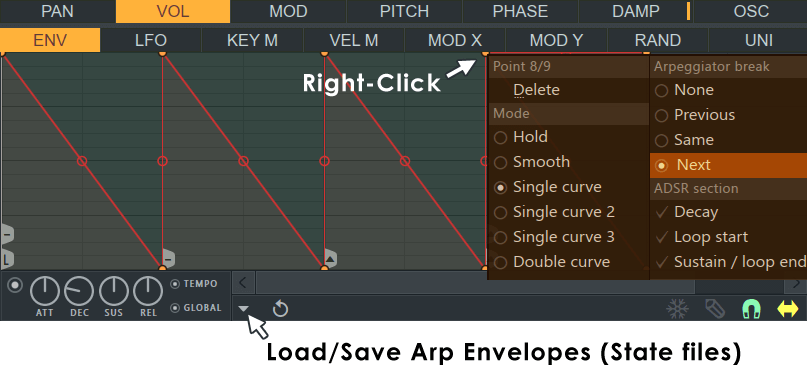
Sytrus has a unique method of creating arpeggios (Arps). Arps are defined by Envelope (usually volume, modulation or filter) arpeggiator 'break-points' that can be applied to the Envelope nodes. See Working with Envelopes for more detail on the basics of Envelope manipulation and also where you can open the Envelope Sequencer Tool.
There are three types of Envelope Break Points used in making arpeggios (the middle three in the picture left), Previous, Same, Next. The first and last nodes relate to the loop start and end points (Loop Sustain start and Loop Sustain End respectively).
When a chord is played and the envelope is set to arpeggiate, each of the notes in the chord is played in turn within the envelope loop, as defined by the Arp break-point flags. Arp break-points are described in more detail below.
Settings
To add or change an Arp break-point, Right-click on the envelope node and select 'Arpeggiator break' from the popup menu, then select one of the following break-point types from the sub-menu.
- None - Use this to clear an unwanted break point.
- Previous(
 ) - At the break-point plays the next note below the previous note played.
- Same(
 ) - Plays the same note as at the last break-point.
- Next(
 ) - At the break-point plays the next note above the previous note played.
Making an Arpeggio
- Generally we advise using the Envelope Sequencer Tool opened from the Envelope menu. However for this tutorial will give you a feel for operating with the arpeggiation controls directly on the Envelope Editor window.
- Open Sytrus and load the patch labeled Default (this is a simple sine-wave on Operator 1).
- Select Operator 1, set the Editor target to VOL and the Articulator part to ENV (this will open up the volume envelope for Operator 1. The same windows should be open as shown above.
- From the Envelope Options menu (
 ) select the Open state file... menu item and open the 'Arp - classic up.fnv' state file.
- You should see a simple triangle-shaped Envelope with a Same break-point on the first node and a Next Arp break-point on the last node. Playing a chord will sound the classic upward repeating Arp.
- Change the last node to Previous and note that Arp descends. Experiment by adding some more Envelope nodes and break-point types. You are now on your way to creating your own Arps - have a look at some of the other Arp presets to learn how they work.
NOTES & TIPS:
- Arps need chords: To hear an Arp you need to play a chord (otherwise there is no 'previous' or 'next' note for Sytrus to play). Single notes will work, sounding the rhythm of the Envelope.
- Envelope loops: If you want your Arp to repeat while you hold down the chord, the first node should be set to Sustain loop start and the last node should be set to Sustain loop end (it is possible to add both Arp 'break points' and 'Loop sustain' flags to the same node).
- Envelope release: Avoid Envelope releases with Arp presets ('release point' envelope data after the 'Sustain loop end' node) as the envelope will play the whole chord.
- Timing: Make sure Tempo and Global selectors are activated in the Envelope settings so that the Arp plays in time with the BPM of your project, and timing of the notes does not drift.
- Per-Operator Arps: The speed of the Arps can be varied on a 'per operator (oscillator)', basis. Very complex and 'cool' patterns are possible.
- Speed: The envelope 'decay' (DEC) knob can be used to increase or decrease the speed of the sequence. The knob is set to 2X speed increments.
Sytrus - The Filter Module
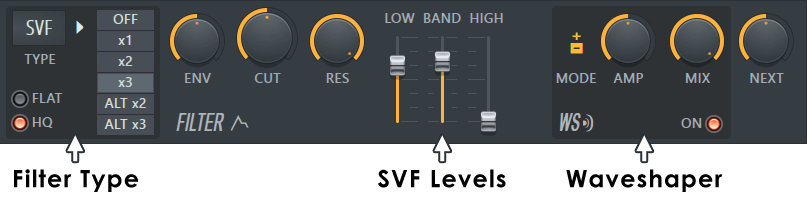
The Filter Module has 13 filter modes and many options that you can tweak to get the perfect sound for your project. It includes a complete articulation section that allows you full control over the filter parameters. The module also includes waveshaping distortion with customizable mapping.
NOTE: The Filter Mode switch is automatable and the SVF filter is capable of handling 3 filter modes simultaneously - low-pass, band-pass and high-pass.
Filter Controls
- Filter Mode (Automatable) - Showing SVF in the image above:
- Filter Type - Select from one of 13 filter types, including a fully-featured SVF 'Chocolate' filter, 8 'Vanilla' filters (Low Pass - LP, Band Pass - BP, Notch - NOT, High Pass - HP, All Pass - AP, Low Shelf - LS, Peaking - PK and High Shelf - HS) and a lowpass 'Mango' filter (NOTE: The 'Drive' for Mango filter is per-voice) . Only the SVF filter will display/use the low/band/high levels on the panel (see the screenshot above). A Phaser filter (PHS) is also included (see below).
- Flat - Applies an alternative resonance algorithm to the filter (try both modes to see which suits your project).
- HQ - Improves filter quality. This option is necessary when operating at sample rates of 44 kHz or less and using the high-pass result of the SVF filter.
- Bandwidth - Sets the filter bandwidth. OFF turns the filter off. x1, x2, x3 are 12, 24 and 36 dB/Octave filters, respectively (i.e how many dB frequencies are cut past the cutoff frequency setting for each doubling or halving in frequency depending on the direction above or below the cutoff). ALT x2 and ALT x3 provide alternative algorithms for the 24/36 dB/Octave filter modes.
- Phaser - The Cherry Phaser is implemented as a filter type (see above) giving you full control of the frequency and enabling the phaser to be synced to the LFO, with full control of the LFO shape.
- Res - Phaser feedback.
- Filter Mode - Phaser order. The buttons marked 1 to ALT x3 provide phaser order 1 to 10. To keep the interface simple ALT x2 and ALT x3 are orders 4 & 5. The 'FLAT' switch adds 5 to these buttons giving you 6 to 10 on the same switches. For example, FLAT + x1 = 6, FLAT + x2 = 7 ... FLAT + ALT x3 = 10.
- Common Filter Settings - These settings control some common aspects of the filter (cutoff, resonance, etc.)
- Cutoff LFO/Env. Amount (ENV) - Adjusts the amount of cutoff LFO/Envelope articulation above the cutoff value. Turn fully left to disable cutoff articulation.
- Cutoff (CUT) - Filter frequency. Affects all modes of the filter - low, band, high, etc.
- Resonance (RES) / Bandwidth - Sets the resonance or "sharpness" of the filter. For bandpass/notch filters, sets the filter bandwidth.
- Low/Band/High Levels - These settings apply only to the SVF (State Variable Filter) filter type. Each slider controls the output from each of the filter bands:
- Low: low-pass,Band: band-pass, High: high-pass. By default, the low-pass level is set to maximum, while the rest are muted.
- WaveShaper Settings - Each filter module includes an optional waveshaper distortion. This distortion maps the input signal amplitude to another amplitude based on the waveshaper mapping (see the Articulation section below). NOTE: The Waveshaper in Sytrus is 'per-voice'.
To enable the effect, witch the ON LED.
- Unipolar/Bipolar (+ / +-) - Allows you to set the waveshaper graph to symmetric (unipolar) or asymmetric (bipolar). Affects the waveshaper envelope presentation (switching from bipolar to unipolar mode loses all the asymmetric information).
- Preamp (AMP) - Allows you to increase the amplitude levels of the signal before it is processed with the waveshaping distortion.
- Mix Level (MIX) - Sets the mix balance between the unprocessed and distorted signals.
- Send to Next - This knob sends the output of the current filter module to the next one (there are three). This feature is available for the first two filter modules only.
Modulation Envelopes (Articulators)
The articulation section allows you to apply an envelope, LFO, map keys, velocity or unison mode voices to a set of pre-defined properties. For a full list of envelopes/mapping in the Articulation section and their descriptions, see envelope editor page.
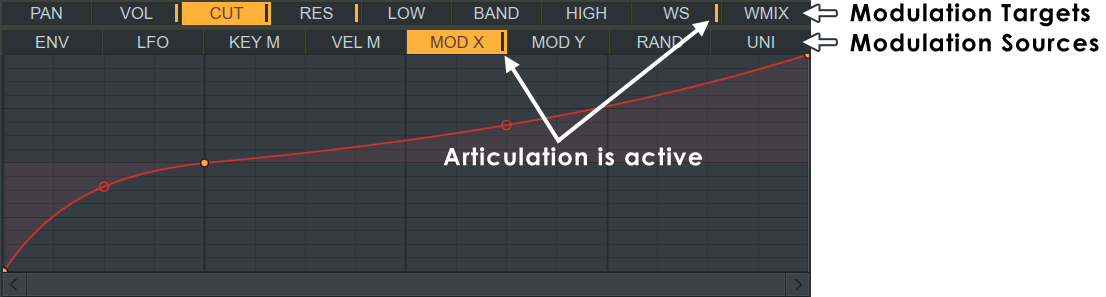
The filter mode supports the following articulation targets (controlled parameters):
- Panning (PAN) - Sets the filter output panning (graph bottom = left panning, graph top = right panning).
- Volume (VOL) - Sets the filter output volume (graph bottom = no output, graph top = maximum output).
- Cutoff (CUT) - Offsets the cutoff levels for the filter (graph bottom = -100 offset, graph top = +100 offset).
- Resonance (RES) - Offsets the filter resonance levels (graph bottom = -100 offset, graph top = +100 offset).
- Low-pass, Band-pass, High-pass Levels (LOW, BAND, HIGH) - Sets the output volume of the corresponding filter mode (graph bottom = no output, graph top = maximum output).
- WaveShaper Mapping (WS) - This is the only articulation target without a full set of envelopes, LFO, etc. It is simply a map describing the relation between the input audio amplitude and the waveshaper processed signal. The horizontal axis represents the input levels (left>right = min>max) while the vertical axis represents the output levels (bottom>top = min>max).
- WaveShaper Mix Level (WMIX) - Sets the output volume of the waveshaper processed signal (graph bottom = no distortion mix, graph top = maximum distortion mix level).
Sytrus - The Effects Module
The effects module offers high-quality chorus effect, 3 delay lines which can process either in parallel or in serial (with the possibility to send the module output to a mixer send track for further processing) and a reverb section.
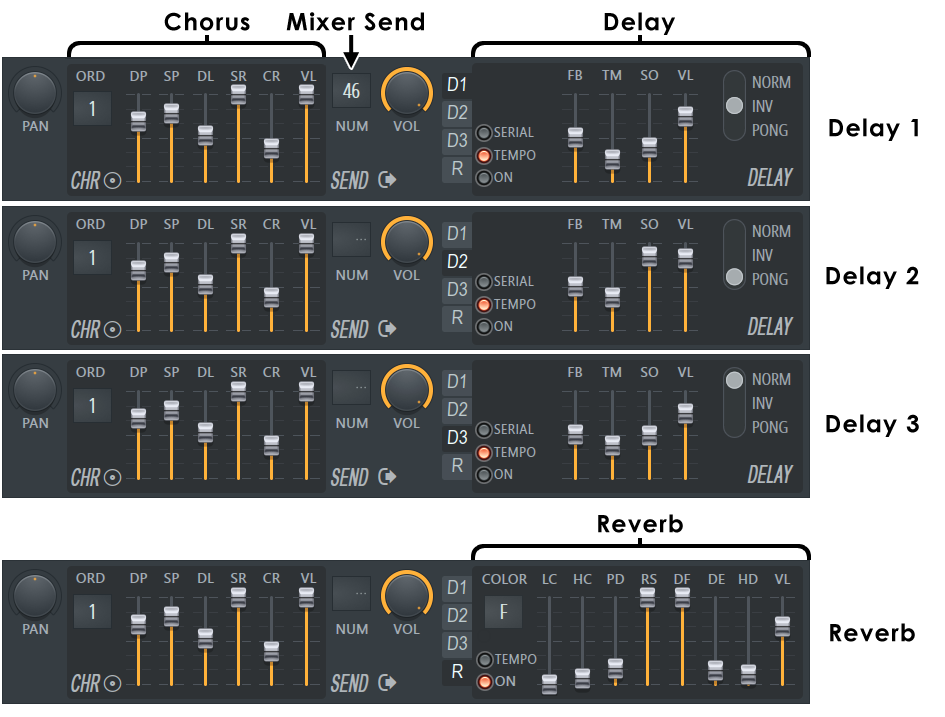
Effects Controls
- Panning (PAN) - Allows you to pan the signal before it is processed by the effects.
- Chorus Effect - The chorus effect enables you to enrich the stereo panorama and depth even for simple patches. It can also be used as a less CPU-intensive alternative to the integrated unison mode (see the main module page), if you don't need to use any of the advanced unison features, such as sub-level voices, custom parameter mapping, etc.
- Order (ORD) - Sets the number of "stacked" flangers to be used for the effect. Using more flangers makes the effect smoother and richer. Drag the screen down until the indicator disappears to disable the effect.
- Depth (DP) - Controls the "chorus depth" (amplitude of pitch oscillation for each of the stacked flangers).
- Speed (SP) - Controls the flange speed (speed of pitch oscillation).
- Delay (DL) - Variable amounts of delay can be applied to each of the stacked flangers. Use this parameter to define the overall amount of delay applied.
- Spread (SR) - Each flanger is assigned a different speed, depth, etc. in a range defined by the basic properties provided for the Chorus effect. Increase the SPRD value to "smooth" the spreading of the stacked flangers across the parameter ranges.
- Chorus Stereo Cross (CR) - This parameter applies a stereo cross mix between the left and right channel audio output of the Chorus effect. Increase the parameter value to mix more of the left channel sound in the right one and vice versa. The parameter has range of -128 to 128. Negative values mix inverted sound in the opposite channel.
- Chorus Level (VL) - Determines the level of the processed signal into the overall mix.
You can load several presets for the chorus effect by clicking the Options button on the Sytrus interface (
)
and pointing to the chorus submenu.
- Send Track Settings - Select a mixer send track and send level if you want to send the signal to a track for further processing.Select the send track number from the LCD (NUM) and adjust the send level (VOL).
- Delay Line Settings - The effects module includes 3 separate delay lines (echo) which can process either in parallel or in serial. To see the settings for each delay line, select one via the D1/D2/D3 switches. To enable the effect, turn on the ON, TEMPO or SERIAL LED.
- Delay Feedback (FB) - Sets the feedback volume. Setting this to maximum will create feedback that never fades out, while setting it to minimum will result in no feedback.
- Delay Time (TM) - Sets the signal delay time (and amount of time between echoes in the feedback).
- Delay Stereo Offset (SO) - Lets you set a time offset for the left or right audio channel, thus creating richer stereo panorama of the delay effect. To delay the left channel, use a negative offset value. To delay the right channel, use a positive value.
- Delay Volume (VL) - Sets the delay line output. Keep in mind this parameter has a range of -128 to 128 - to decrease the delay volume, position the slide near the middle. Negative values produce echoes with inverted signal (phase).
- Delay feedback Mode (NORMAL, INVERTED, P.PONG) - Sets the feedback stereo mode. Normal preserves the original stereo, Inverted swaps the left and right channels once, Ping Pong swaps the left and right channels for each successive echo.
- Tempo Based (TEMPO) - Enable this switch to make the delay speed tempo based rather than absolute in time.
- Serial Processing (SERIAL) - Enable this switch to feed the next delay filter with the output of the current delay (thus processing in serial as opposed to independent parallel processing). The first two delay effects feed to the next Delay, the third feeds to the Reverb.
- Enabled (ENABLED) - Turn this switch on to enable the current delay line.
- Reverb section - The effects module includes a high quality reverb based on the Fruity Reeverb FX plugin.
- Color Selector - Color has five settings: Brighter (B+), Bright (B), Flat (F), Warm (W), Warmer (W+). The Color parameter is used for adjusting the decay time of the bass frequencies of the signal. This allows you to change the overall perceived mood or 'sound' of the virtual room. A bright room has a low bass response, while warm rooms have a higher bass response. In a flat room, the response of the bass is equal to the general frequency response.
- Low Cut (LC) - Adjusts the low cutoff frequency. Use this to remove low frequencies from the input signal before reverb is added. For example, if you are adding reverb to, say a drum track, you might want to remove some of the 'rumble' from the bass drum by attenuating the bass frequencies. Setting this parameter to the minimum value will bypass the Low Cut filter, displaying OFF in the value field.
- High Cut (HC) - Similar to the Low Cut, this adjusts the high cutoff frequency. Use this to remove high frequencies from the input signal.
- Predelay (PD) - Controls the delay time between the direct input signal and the first reverb reflection. This should be set to modest values for small rooms, and can be increased in relation to increases in room size. Predelay creates a slap-back echo effect that can both add atmosphere and muffle the signal, so use it wisely.
- Room Size (RS) - Use this to set the size of the virtual room where the reverb is created. The Room Size should be adjusted according to the decay time. Small rooms sound better with a short decay time, large rooms sound better with longer reverb times.
- Diffusion (DF) - Controls the density of the reflections bouncing off the walls of the virtual room. A low diffusion setting makes the reflections sound more distinct, like closely spaced echoes. A high diffusion setting creates reflections so close they sound more like noise, where no echoes can be distinguished.
- Decay (DE) - Controls the decay time of the reverb, the time it takes for the signal to decay to -60dB (1/1000 of the maximum amplitude). Use low decay times for small rooms or boxes, and long decay times for large rooms, halls or churches. You should also make sure that the Room Size parameter has an appropriate value.
- High Damping (HD) - This parameter allows you to adjust damping of the high frequencies in the reverb signal over time. Damping refers to the high frequencies being attenuated and dying out. This causes the sound to become gradually muffled and warm like it is being absorbed in the room. Setting this parameter to the maximum value will bypass the High Damping, displaying OFF in the value field.
- Wet Volume (VL) - Sets the relative reverb (wet) signal level.
Effects Articulation
The articulation section allows you to apply an envelope, LFO, map keys, velocity or unison mode voices to a set of predefined properties. To see the full list of envelopes/mapping in the articulation section and their meaning, please check the envelope editor page.
The filter mode supports the following articulation targets (controlled parameters):
- Panning (PAN) - Sets the module panning (graph bottom = left panning, graph top = right panning).
- Volume (VOL) - Sets the module volume (graph bottom = no output, graph top = maximum output).
Sytrus - Basics of FM Synthesis and the Modulation Matrix
Most of today's software synthesizers use a process known as 'subtractive synthesis' - a spectrum-rich oscillator (saw, square, triangle, etc.) is processed with a low-pass, band-pass, or high-pass resonant filter to produce the final sound. FM (Frequency Modulation) uses a different approach - pure tones (sine waves) processed in such a way that additional harmonics are created (one sine wave modulates the frequency of another) and added to the signal to produce the final sound. Unlike with Subtractive synths, the basic sound generating module of an FM synth is called an 'operator', which includes a pure tone oscillator (sine wave) and an articulation section. It is called an operator because it can do more than just create sound, it is also a modulator and so 'operates' on other operators.
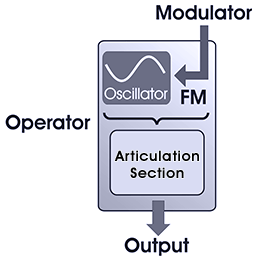
FM synthesizers contain two or more operators (Sytrus supports up to six operators). When an operator is connected to the input of another, a pitch (frequency) modulation occurs (see diagram, above). The modulating operator is known as the 'modulator', while the modulated operator is called a 'carrier' (in Sytrus a single operator can act both as a carrier and modulator).
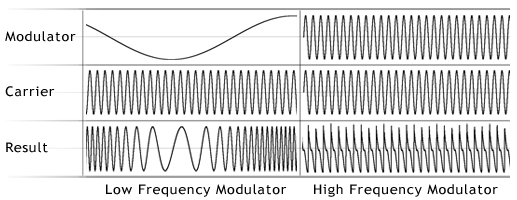
Sytrus Implementation
Sytrus offers everything found in classic FM synthesizers and supports up to six operators and a modulation matrix, in which you can define the synthesis algorithm. Sytrus also includes a set of advanced features which allow you to create many unique sounds:
- Custom Oscillator Shape - The oscillator shape of each operator can be tweaked in various ways, such as adding harmonics, morphing to shapes other than sine (square, triangle), pulse width, add noise, etc. An operator can also be set to generate plucked string tones with a fully customizable damping envelope, which can be indispensable for string and pads patches.
- Ring Modulation - Besides FM (frequency modulation) and additive mixing, Sytrus operators can also interact in RM (Ring Modulation) mode. Ring Modulation is the process by which two input signals are multiplied together to produce a new sound, often with characteristics which are qualitatively different from the original input signals.
- Support for Subtractive Synthesis - Sytrus includes three fully-featured SVF (filter) modules which can be used to filter the operators' output. By combining both additive (FM/RM) and subtractive (SVF) synthesis techniques, Sytrus offers a very flexible means of producing a wide range of sounds, without the need for additional plugins or processing.
- Effects Module - Offers a range of effects to treat the patch sound, including three delay lines (which can process in parallel or serial mode) and a high-quality chorus effect to add depth to Sytrus patches. The signal from the effects module can also be sent to a mixer send track for additional processing.
- Fully Customizable Articulation - Mapping diagrams, LFO and envelopes in Sytrus extend far beyond simple ADSR volume envelope support. Each diagram and envelope state can consist of unlimited number of curve segments, with control of pitch, volume, panning, velocity mapping, and unison settings, etc. This allows for more complex patch structures, including even programming whole drum and synth loops into a single patch/voice.
- Programmable Unison Mode - Supports sub-level voices, variable pitch, pan, volume and envelope variation. Uniquely, each property targeted in the articulation sections of the modules can be mapped by the patch creator to the unison voices following 100% customizable mapping graphs, which allows almost every voice in the unison to have different properties (for more information, see the main module).
NOTE: If you want to create your own Sytrus patches or modify existing ones, it is recommended to check the Sytrus processing diagram. It describes in detail how the Sytrus modules are processed and mixed:
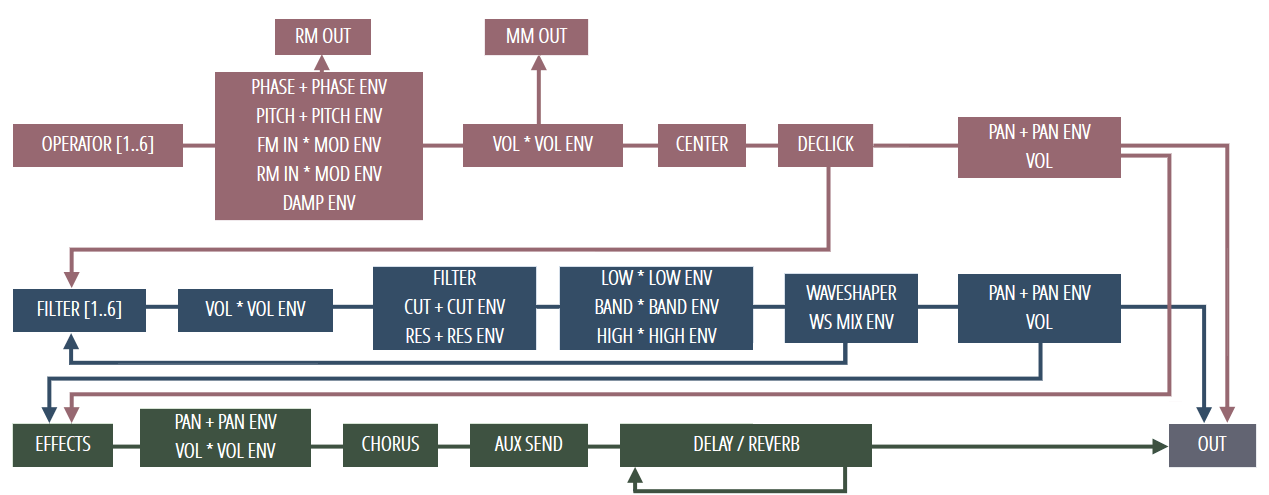
NOTE: About signal flow. Items in the same block are effectively processed at the same time, and have no order. Except Delay & Reverb that depends on the delay sections serial/parallel setting. The diagram is accessible from a button on the Sytrus interface:
The Modulation Matrix
The modulation matrix in Sytrus allows you to set up the FM synthesis algorithm and to adjust the operator send levels for effects and filter modules, and panning and 'dry' output levels.
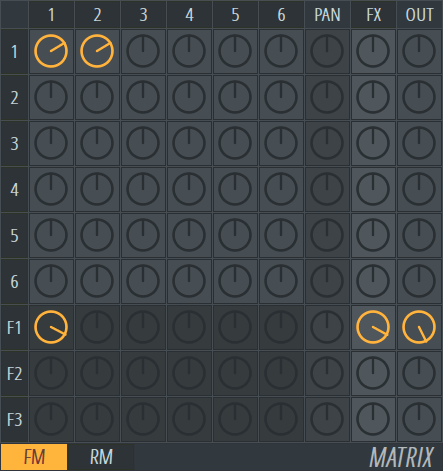
SUPER IMPORTANT POINT: You can't automate the knobs in the FM or RM matrix. However, for FM you can automate or modulate the Volume knob (VOL) on the Operator (Oscillator) Module. This has the exact same effect as modulating the matrix knobs since you are changing the amplitude, and so amount of the Frequency Modulation.
Each matrix knob controls a specific function or mapping (as explained below). The neutral position for each knob is the middle Use Alt + Left-click to reset a knob to its neutral position. You can also Right-click a knob to quickly mute/unmute, while preserving the knob value (this feature is useful when testing and tuning a patch)
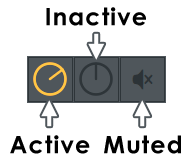
The modulation matrix comprises several discrete parts. Below we will take a more detailed look at each section and its applications:
Modulation Setup
The FM/RM section programs the modulation algorithm in Sytrus. Each row represents an operator (oscillator) and determines which operators will modulate it and by how much. The knob settings determine the amount of modulation - if the value is negative (turn the knob left) the modulation phase will be inverted. At the neutral level (Alt + Left-click a knob), there will be no modulation. It is not necessary for an operator to be modulated in order for it to produce output. When the Modulation matrix is in the Inactive state, Sytrus is acting as a Subtractive synth (with Additive oscillator control, of course).
Some FM routings and their representation in the Sytrus matrix:

In these examples, Operator 1 is used as a carrier while the rest of the active operators are modulators. You can modulate an operator by itself (in Example 3 - row 2, column 2 - modulating Operator 2 by itself), thus creating a feedback effect. Note the carrier must be assigned an output, either directly (as in the examples), or via the filter modules. For more information on filters and output assignment, see the other two matrix sections covered below.
NOTE: If you're unsure of the purpose of any knob in the matrix, simply hover your mouse over it and check the FL Studio Hint Bar.
Ring Modulation
Sytrus also supports RM (ring modulation) interaction between operators, which is a form of Amplitude Modulation. To see and adjust the RM setup, click the FM/RM switch at the bottom of the matrix:

In RM mode the amplitude of the target Operator is modulated. You can confirm this by Ring Modulating an operator by another, set to a very low frequency. Similar to FM, when amplitude is modulated at high-frequencies (audio rates) new tones / harmonics are generated. In RM mode the knobs adjusts the amount of signal sent from each operator to the filter modules. Negative values will send an inverted signal to the filter modules.
NOTE: The RM switch only affects the modulation type and routing section of the matrix. The rest of the settings (pan, FX send, filter send, etc.) are shared among the FM/RM matrices.
Filter Send Levels
Sytrus includes three filter modules. Each row in the section represents one module. If you want to send 50% of the output from operators 3 and 4 to filter section 2, adjust the knobs as follows: in row F2 (filter section 2), adjust the knob in column 3 (operator 3) to 50%; in the same row adjust the knob in column 4 (operator 4) to 50%. To reset a knob to a neutral position, use Alt + Left-click.
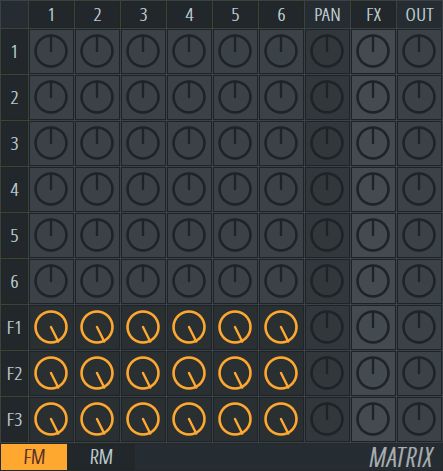
NOTE: The output of the filter sections must be assigned an output. To learn more, see the Pan, FX Send and Output section below.
Pan, FX Send and Output
Set the panning, effects send and output amounts for each of the operators and the three filter sections. The first column sets the panning of its corresponding module (operator or filter). The default position is center. The second column defines the amount of signal sent to the effects module. If you set this knob to a negative value, an inverted signal will be sent to the effects module. In the default neutral position (middle), no signal is sent to the effects module. The third column defines the output amount for its corresponding module (operator or filter). A negative value will send an inverted signal to the output.
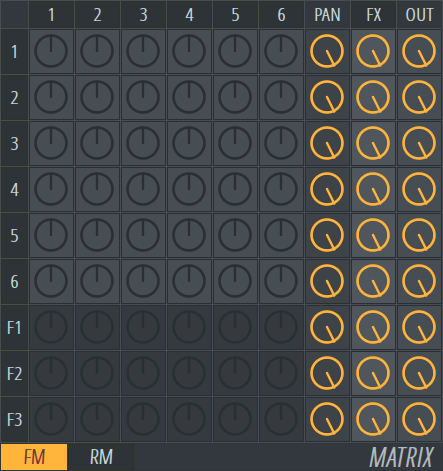
IMPORTANT: Neither the operators or filter modules in Sytrus produce audio automatically. You'll need to use the matrix to rout them to the output stages as follows:
- Assign an output level for the module from the matrix section.
- Assign an effects send level for the module (the effects module is automatically sent to the output).
- (operators only) Assign the operator a filter send level via the Filter Send Levels matrix section (see above). The filter module you send to needs to 'reach' an output by itself.
- (Filters only) Use the Send to Next knob (see the filter module page for more info).
Sytrus Tutorials
Download this PDF
We recommend downloading - Sytrus Synthesis Manual - 2nd Edition by Jens Malmgren.
Overview of FM Synthesis
FM Synthesis is typically regarded as black magic by many synthesizer programmers. The Yamaha DX-7, the first popular FM synthesizer, was reported to have 90% of maintenance returns complete with their presets intact. You have probably browsed through the presets in Sytrus, and wondered, 'how did they do that'?. The next step, then, is usually to search the Internet for FM synthesis tutorials, only to discover that most of them tell you how to program a Yamaha DX7, or a particular DX7-like FM synthesizer to achieve a handful of particular sounds. But there's no clear idea how those "FM fundamentals" apply to Sytrus'. This tutorial will help remove some of the mystery from FM synthesis in general, and help you on your way to understanding what all those mysterious controls and knobs in Sytrus do.
See Sytrus video tutorials
on Image-Line's YouTube channel.
Operators, Modulation Matrix, or Filters.
This tutorial is all about the Sytrus FM synthesizer, and the purpose behind the most important controls on its variety of control panels. This tutorial will not discuss each knob and slider, and how each individual control affects the output signal. However, after proceeding through this tutorial, you will understand:
- What an "operator" is.
- How the modulation matrix is configured to route sounds from the oscillators through the modulators, filters, and effects processing to the output.
- How to apply a filter to an operator.
- The single difference between FM and subtractive synthesis
Step 0: Learn about subtractive synthesis basics
It's fairly easy to get a basic grip on FM synthesis. Starting with simple waveforms, filters and envelopes are applied to get different "effects" on the final sound. With most subtractive synthesizers, you can pick a knob at random, tweak it, and likely hear a difference in the sound that comes out as a result. The 3xOSC plugin is a great place to start. Once you're comfortable with terms like, "oscillator", "LFO", "cutoff", and "ADSR", you may proceed.
Step 1: Understand what you're looking at in Sytrus
- Add a Sytrus channel. Click the "plug" in the upper left of the window, and select the "Default" patch. This patch produces a pure sine wave output. Ignore the 9x9 matrix control on the right side of the window for now.
- Click the "MAIN" box in the upper left to see how the synthesizer's overall characteristics are defined. These parameters operate on the signal that comes out of the synth/filter/pan/fx module. You can apply an overall volume and filter envelope, tweak the basic EQ, add a unison effect, and determine which parameters are affected by the x/y modulation controls.
- Click on the "OP 1" box towards the top of the window. This panel defines "Operator #1". An operator is simply a waveform; some audio signal. You can see one cycle of it in the box in the upper left. The sliders and knobs to the right of the waveform display allow you to modify some characteristics of the waveform. The row of buttons, "PAN", "VOL", etc. allow you to modify the characteristics of the waveform. "OP 2" through "OP 6" allow you to define five more waveforms.
- Click on the "FILT 1" box towards the top of the window. This panel defines "Filter #1". The panel and rows of buttons allow you to specify the characteristics of a filter, which can be applied to the output of the operators. "FILT 2" and "FILT 3" allow you to define two more filters.
- Click on the "FX" button towards the top of the window. This panel defines a basic effects chain consisting of panning, chorus, three delay units, and reverb.
Step 2: Sytrus, the Subtractive Synth, part 1 - The Sawtooth Wave
As a first step in learning how to program the Sytrus synthesizer, we will examine its capabilities as a subtractive synthesizer. This will build on our knowledge from Step 0, above, as we start to learn how to find our way around Sytrus without getting too complicated.
- Go back to the "OP 1" panel, and slide the "SH" slider (just to the right of the waveform display). As you slide it up, the waveform will change from a sine wave through triangle, saw, and square patterns, ending up with a square pulse. Set the slider in the middle of its range (50%) to produce a sawtooth wave. Play some notes and listen to the buzzing of all the high frequency components in the sawtooth wave.
- Now we'll take a look at the modulation matrix. In the Default preset, only one knob is activated. On the far right of the OP1 row, the knob in the "OUT" column is turned all the way up, to 100%. This knob indicates that the output from OP1 should go straight to the output at full volume. Each of the top six knobs in the "OUT" column indicate how loud each of the operators should be in the output mix. The bottom three knobs indicate how loud the output from each filter should be in the output mix.
Step 3: Sytrus, the Subtractive Synth, part 2 - a basic filter envelope
- Now, we'll apply the default filter to the saw wave in operator 1. First, Right-click the OP1 output level knob to mute it. Play some notes. Note that there is now no output from Sytrus. At least one of the various output knobs must be turned on to generate any output. So, to activate the output of filter 1, turn the output knob on the F1 row up to 100%. Play some notes. Note that there is still no output from Sytrus. At this point, we're sending 100% of the output from the filter to the output. However, there's no input signal to the filter, so no sound will be generated.
- To send some of the OP1 signal to the first filter, turn on the knob in the first column of the F1 row, and set it to the full on position, 100%. This sends the output of OP1 to the first filter. The output knob in the F1 row sends the output of the first filter to the output module. Play some notes. The default filter, applied to the saw wave produces a cheap synth horn sound.
- Activate the cutoff envelope for the first filter. Click on the "FILT 1" button toward the top of the window. This displays the Filter 1 settings. Click the "CUT" button in the middle row of buttons. This displays the parameters for the filter cutoff envelope. Click the "ENV" button to display the default envelope. Just under the bottom of the graphical envelope display are four knobs to set the Attack, Decay, Sustain, and Release parameters of the envelope. To the left of these four buttons, is a small, hollow radio button. The default setting is "off", indicating no filter cutoff envelope should be applied. Click the radio button to activate the filter cutoff envelope. Play some notes. Note how the cutoff envelope alters the sound of the "horn". Experiment with the ATT, DEC, SUS, and REL knobs to see how they alter the sound of the wave.
Step 4: An Introduction to Modulation
The modulation operation: Basically, two waves combine in a magic way to create a richer spectrum output. It is important to note that OP1 modulating OP2 (OP1*OP2) does not produce the same output as OP2 modulating OP1 (OP2*OP1). Well, it's not that important, but just know that tweaking the OP1/OP2 modulation parameter will result in a different output than tweaking the OP2/OP1 modulation parameter.
Step 5: Sytrus, the FM synth, Simple Modulation
- First, deactivate the filter by Right-clicking on the OP1/F1 knob. Re-activate the OP1 output by Right-clicking on the OUT/OP1 knob. Play some notes. The sound should be that of the original, unfiltered, buzzy, sawtooth wave.
- Now, apply some modulation to the sawtooth wave. First, play some notes to get a feel for the unmodulated sawtooth wave. Now, click the knob in the OP2 column of the OP1 row, and turn it to a setting of 25%. Play some more notes. Hear how the buzzing quality has changed slightly. Turn the modulation knob from 25% to 50% and hear how the quality of the sound has changed again. Try settings of 75% and 100%.
Congratulations! you've now created an FM synth patch.
Step 6: Filtering a modulated signal
- Now, we'll apply the filter we created above to the FM modulated signal. Deactivate the OP1 output by Right-clicking on the OUT/OP1 knob. Make sure the OUT/F1 knob is activated. If not, Right-click it to activate it. Activate the OP2/F1 knob by turning it to 100%. Play some notes. The sound will be that of a pure sine wave. What's going on here?
Well, what we actually did is route OP2 (an unmodulated sine wave) into Filter 1. Operator 2 is still at its default setting of a sine wave, so the output generated is a filtered sine wave, or, in other words, a sine wave. What we wanted to do is send OP1 into Filter 1. (This may be the most confusing feature of the modulation matrix itself.) This is part of what I mean by OP1*OP2 not being the same as OP2*OP1. Since we configured OP2 to modulate OP1, in order to send the modulated OP1 output to a filter module, we must use the OP1 column of the desired filter row to route that signal accordingly.
- To route OP1 into Filter 1, deactivate the OP2/F1 knob by Right-clicking on it, and re-activate the OP1/F1 knob by Right-clicking on it. Now, we are routing the modulated OP1 signal into the filter. Play some notes. Now, the filter we created above is acting on the modulated signal.
Step 7: The single difference between FM and Subtractive synthesis
-
Subtractive synthesis uses richer waveforms (triangle waves, square waves, etc.) as the base signal before applying filtering, resulting in higher order harmonic content in the synthesized signal. FM synthesis creates richer waveforms via modulation, resulting in "sidebands" of the carrier signal (i.e. the operator being modulated). That's it. Both use filters, envelopes and modulators on the sound. Once you understand what the knobs in the modulation matrix do, you're off and running.
FM Synthesis can seem intimidating because it does not seem as intuitive as basic subtractive synthesis. The 'sidebands' resulting from the modulation operations are not as easily visualized as relatively simple square waves, or triangle waves. Also, FM synthesizers typically have much more complex envelopes and automation capabilities (see the 'Electrocution' preset for a complex automated filter example), adding to their complexity and intimidation factor.
Tutorial credits: Eric Mitchell.
Sytrus - Notes & Tips to Patch Creators
Please check the following recommendations to ensure that the patches you make are immediately usable, merge with the other presets, & don't waste CPU power, when it can be avoided at no quality loss:
- It is recommended to copy/paste the details text from the Default preset. The layout and colors are easy to read and provide a common format for the details text in all patches.
- Don't leave knobs in the matrix active if they are not to be used. For example, if a filter is not used, it should not have an output level.
- Envelopes: pay attention to the sustain point, it is the most important part of the ADSR envelope. A voice stops when all of the envelopes have completed their release part. The envelope section after the sustain point is important and it is recommended that all of the operators & FX should match it.
- When previewing your patch, try to press a key for a very short time, & see if it still releases properly (if there is a problem, you will hear a "lag" in release response even if you don't use long release time). If not, an articulator inside your synth is holding the voice active, try to find it and adjust it accordingly.
- For patch sounds like bells or drums, if a voice needs to act like a "one shot" regardless of the voice length, you can duplicate the part before the release section after the release section (if a voice is released instantly, the release section is used, otherwise the sustain section is used, yielding identical results in either case).
- Pay attention to possible DC offset. If your patch causes a DC offset, switch the "center" option on for the oscillator/s that cause that effect.
- Pay attention to keyboard mapping. With FM synthesis you might need to check if higher notes produce aliasing, & reduce the modulators levels using the keyboard mapping if needed. The last key you've pressed shows in the keyboard mapping editor.
- To increase usability of the preset, always try to give a use to the integrated X/Y Controller (Mod X/Y) and explain what each direction means, as in the included presets.
- Chorus/unison: do not set Order to max, if 4 or 5 sounds the same or similar enough. This is especially true for the unison effect, where with the increase of order, more and more actual voices are generated and mixed together to produce a single voice in your sequence (order 6 = 6 subvoices per voice) which substantially increases CPU usage for your patch. If sublevel is used, then additional set of voices is generated.
- Aliasing: try to avoid aliasing using the 'Band-limit waveform' option in preference to oversampling: 4x oversampling = 4x more CPU usage, for example.
- Shapes: try to avoid using custom shapes for more than 2 or 3 operators (unless the specific patch requires it). Due to the serialized processing, it matters for the cache, thus to the CPU usage. Try to keep at least 3 oscillators as pure sines, so that they are shared.
Other Tips
- If you want to start a patch from scratch, load the Sytrus preset named Default. All controls in this preset are reset to their default state.
- Always ensure the oscillator has rich spectrum if you are going to use it in plucked string mode. The best way to ensure that is to add good amount of noise via the Noise modifier.
- You can use a modulator with very low pitch as a vibrato effect on the carrier.
- If you don't use the advanced features of the unison mode, you can try using the chorus effect in the effects section instead and save some CPU power.
Sytrus - Options and Helpers
Left-click on the symbols to open the following features:
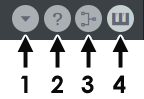
- Options / Presets - Contains a menu with several items as described below:
- Presets
- Yamaha DX7 Presets - Opens a file browsing dialog to import DX7 SYSEX data. Sytrus will then read the patch and emulate the original DX7 sound. Imported DX7 presets appear as sub items in the DX7 menu.
- Copy / Paste preset - Copy and paste presets.
- Oscillators
- Copy / Paste oscillator settings - Allows you to copy and paste settings between operators.
- Reset waveform settings - returns the Operator to the default state.
- Randomize waveform settings - randomizes the waveform settings, use when you are stuck for ideas. And in the same way that idly fiddling with a Rubik's cube may solve the puzzle...you may end up with a great sounding patch.
- Morph oscillator 1 to 5 - Morphs oscillators 2,3 and 4 to create a series of wave-forms linking the end points in a smooth progression.
- Effects
- Unison - Unison is the process of creating extra (detuned) voices, Sytrus can generate up to 9 unison voices per operator. This option contains a number of unison presets to browse and select. The Distribution sub-option, specifies various panning methods. Set by ear.
- Chorus - Browse Chorus presets for the FX module.
- Reverb - Browse Reverb presets for the FX module.
- Tone
- Arpeggio:
- Invert - Inverts the arpeggio settings in the envelope.
- Portamento:
- Variable time - Pitch envelope attack length defines the duration of a 12 semitone sweep, this is used to calculate a per-semitone glide time that is then applied to any range. In other words a constant per-semitone portamento rate is applied so that portamento duration depends on the note interval, hence the name 'variable time'.
- Track origin - This option takes into account keyboard mapping and applies the portamento 'end' note keyboard-map properties to the 'start' note. For example, if the end note had a low filter cut-off, Sytrus will apply this value to the start note. If the option is off, keyboard map values will be applied at a C5 note value.
- No limit - Unlimited portamento range.
- Octave wrap - An interval larger than one octave will wrap to less than one octave, that is a glide from C4 to E5 will play as C5 to E5
- 1 to 4 semitone limit - Determine how far the slide will travel before cutting out. For example, a 4 semitone limit (when a larger than 4 semitone interval is played) will slide for 4 semitones before jumping to the target note.
- Velocity: - These are toggle-switches.
- Link velocity to volume - Modulates the note output volume on the basis of velocity (normally on).
- Link velocity to attack time - Modulates the volume envelope attack time on the basis of velocity.
- Link velocity to attack length - Modulates the volume envelope attack length on the basis of velocity.
- Link velocity to release length - Modulates the volume envelope release length on the basis of velocity.
- Arpeggio:
- Presets
- Show information - This shows the Sytrus version and information screen, to revert to the normal Sytrus user interface Left-click on the screen again.
- Show block diagram - This shows the Sytrus internal signal routing diagram. Click the user interface again to return to the normal Sytrus interface.
- Show keyboard - This shows/hides the preview keyboard.
Plugin Credits
Code: Didier Dambrin.
Vectorial UI: Miroslav Krajcovic.
Vectorial Sytrus logo: Valentin Prados.
VSTi port: Frederic Vanmol.
Many thanks to: Bram (oversampling), Jaha (for showing the wrong path :), Antti, Robert Bristow-Johnson (for making their filters public) , and all the ones who designed presets.
Reverb by: Ultrafunk.