WAVE EDITOR / RECORDER
Edison 
Edison is a fully integrated audio editing and recording tool. Edison loads into an effect slot (in any mixer track) and will then record or play audio from that position. You may load as many instances of Edison as you require in any number of Mixer Tracks or Effects slots. To open Edison press Ctrl+E in a Sampler Channel, or load from the effects menu into mixer track/s.
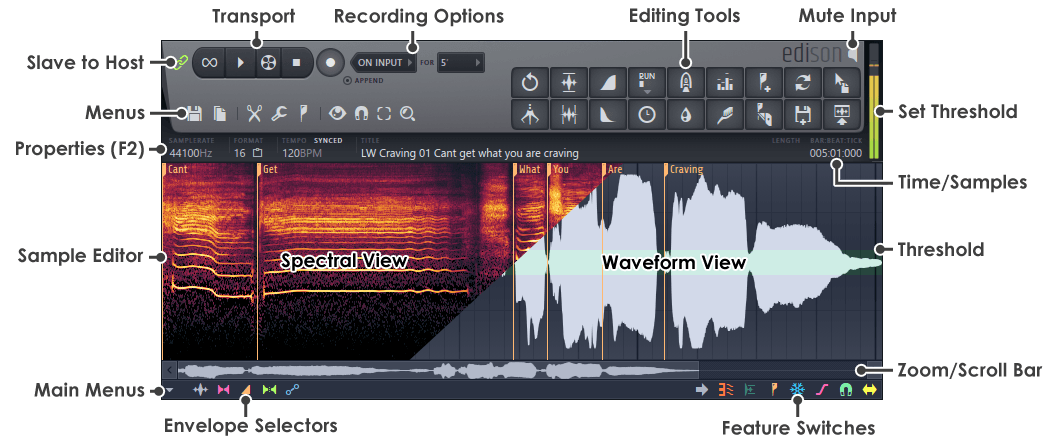
Transport Controls
Recording Options
Menu Buttons
Sample Edit Functions
Special Controls
Peak Meter
The peak meter has some special features.
- Read value - Hover at the point of interest (peaks for example) to show the value in the Hint Bar.
- Set gate threshold - Left-click and drag the mouse up/down to change the threshold for noise gating functions. A green band will display (as shown above) in the Sample View Window. Parts of the wave that cross above or below the green band are 'trigger events'. These level triggers are used for both the 'Record on input' feature and some 'Trim' and 'Gate' functions under the Tools options.